

RAM is an important specification of your smartphone. How much memory your phone has can significantly affect its performance. If you want to know how much RAM your Android phone has, read the article below.
To see how much RAM your Android phone has, you first need to enable the hidden developer options menu . You can do a lot with these lesser-known settings , including how much memory your phone uses .
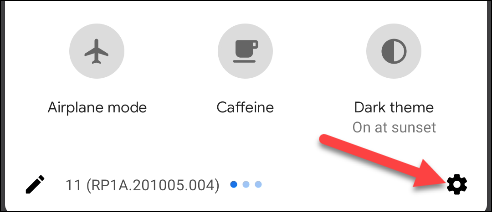
First, scroll down from the top (once or twice), then tap the gear icon to open the Settings menu.
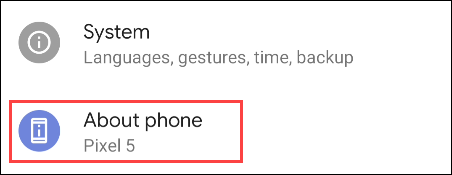
Then, scroll down and select “About Phone”.
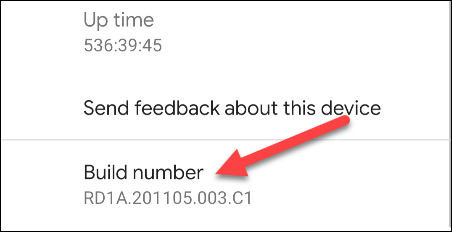
At the bottom, tap “Build Number” repeatedly until the message “You are now a developer” appears.
Then, return to the main Settings menu and tap “System”.
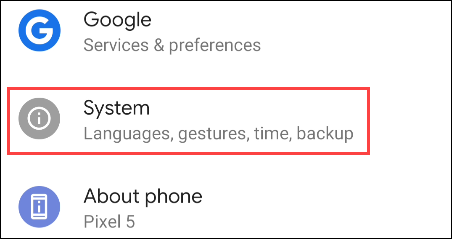
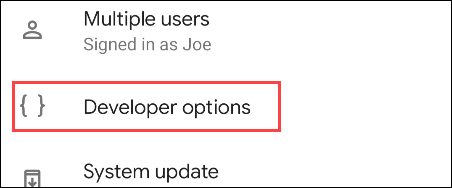
Tap the new “Developer Options” section. If you don’t see this section, check the “Advanced” section.
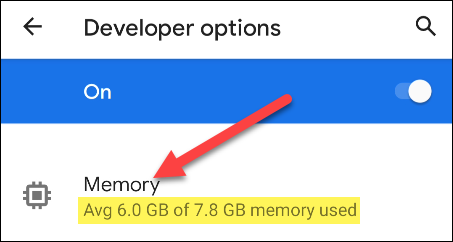
At the top of the page, you'll see "Memory," as well as how much memory you have, but you can tap this option to see even more information.
This screen will look slightly different on each phone, but the number next to “Total Memory” is how much RAM your phone has.
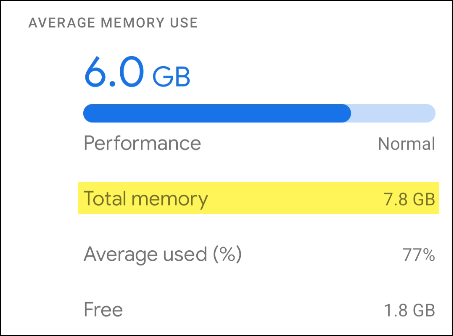
The RAM listed here will usually be slightly less than what you think you have. For example, the Pixel 5 has “8GB of RAM,” but the system only shows 7.8.
The amount of RAM your phone has won't change, but you can always check to see how much of the memory you're using.
Source: howtogeek.com
