Find out which add-on allows you to automatically delete your history after a certain number of days!

Expire history by days is a free add-on for Firefox that allows you to clear your browser history automatically, based on a specific number of days that you define!
Firefox , by default, allows you to clear your history manually, by selecting History -> Clear Recent History from the settings and then specifying the desired time range (Last hour, last two hours, last day, etc.) , or automatically, by closing the browser.
There are clear benefits to clearing your history regularly. This way you can free up space on your system disk, or remove cookies and metadata from old sites that you no longer care about.
#Expire History by Days#
This Firefox add-on is designed to automate the process of deleting your browsing history. Instead of having to choose between automatically clearing your browser (via the “clear everything on exit” option) or manually deleting your history, you simply set the browser to delete all history items after a certain number of days!
#How it works
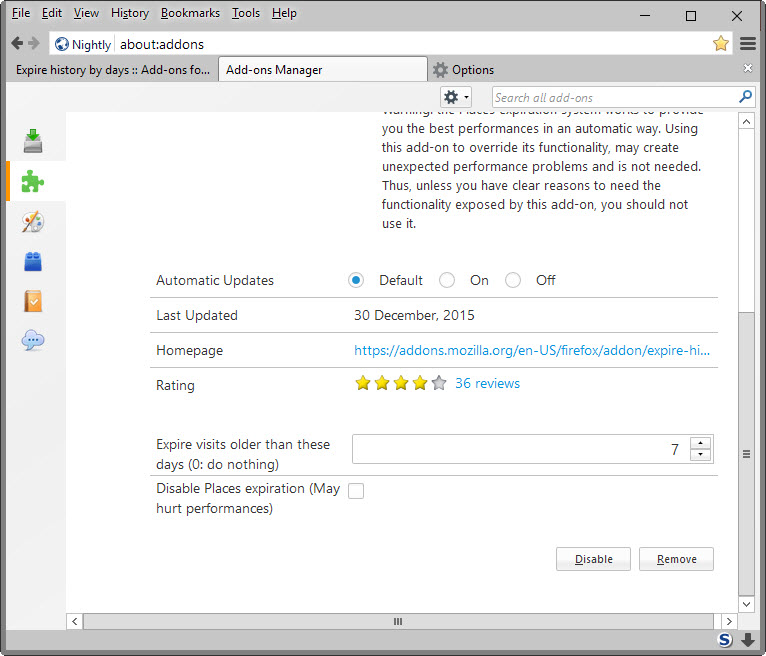
After installing the add-on in your browser, type “about:addons” in Firefox’s address bar and then go to the add-on’s options.
In the “expire visits older than these days” field, enter the desired number of days after which your history will be automatically deleted. The add-on takes care of the rest!
The first run of the add-on may slow down Firefox a bit, depending on the size of your browser history. Subsequent runs will be faster.
#Summarizing…
Expire history by days adds an interesting option to Firefox, as it allows you to automatically clear history after a certain number of days.
You can install it from here: https://addons.mozilla.org/firefox/addon/expire-history-by-days/ and let us know what you think by leaving your comment below.