

 Japan CERT (computer emergency response team) has released a toolthat allows users Windows . to check if they have been infected with the Emotet Trojan
Emotet is one of the most popular malware. Cybercriminals prefer it because it is very effective. It is distributed through phishing emails that usually contain malicious Word documents.
These emails are presented as invoices, notifications, billing statements, invitations, and even warnings about the coronavirus. The goal is to confuse the victim and trick them into opening the attachment.
Once installed, Emotet will use the infected computer to send spam emails to other victims. It also installs other malware.
Emotet usually downloads and installs the banking trojan Trickbot, which steals stored credentials, cookies, browser history information, SSH keys, and more. It also attempts to infect other computers on the same network.
If the network is “high value,” TrickBot will trigger the Ryuk Ransomware to encrypt it.
Therefore, Emotet is very dangerous. Victims should immediately identify it and remove it before it can install other malware.
EmoCheck: The tool for detecting Emotet
When Emotet is installed from a malicious attachment, the trojan is stored in a "semi-random" folder under %LocalAppData%.
The folder name is semi-random, because it does not use random characters, but consists of two keywords from the following list:
duck, mfidl, targets, ptr, khmer, purge, metrics, acc, inet, msra, symbol, driver, sidebar, restore, msg, volume, cards, shext, query, roam, etw, mexico, basic, url, createa, blb, pal, cors, send, devices, radio, bid, format, thrd, taskmgr, timeout, vmd, ctl, bta, shlp, avi, exce, dbt, pfx, rtp, edge, mult, clr, wmistr, ellipse, vol, cyan, ses, guid, wce, wmp, dvb, elem, channel, space, digital, pdeft, violet, thunk
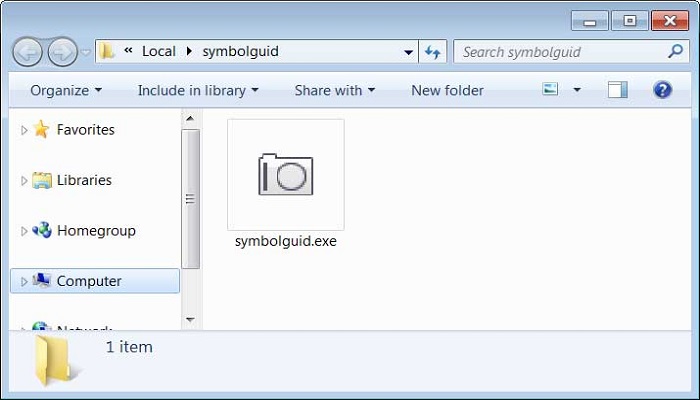
As shown below, Emotet was installed in the ‘symbolguid’. (combination of two words from the list).
To check if you are infected with Emotet, you can download the EmoCheck tool from Japan CERT's GitHub repository.
After downloading, extract the zip file and double‑click the emocheck_x64.exe (64‑bit) or emocheck_x86.exe (32‑bit) version depending on what you downloaded.
Once it runs, EmoCheck will start scanning. If it finds that computer is infected with Emotet, it will notify you. It will even find the location where the malicious file is located.
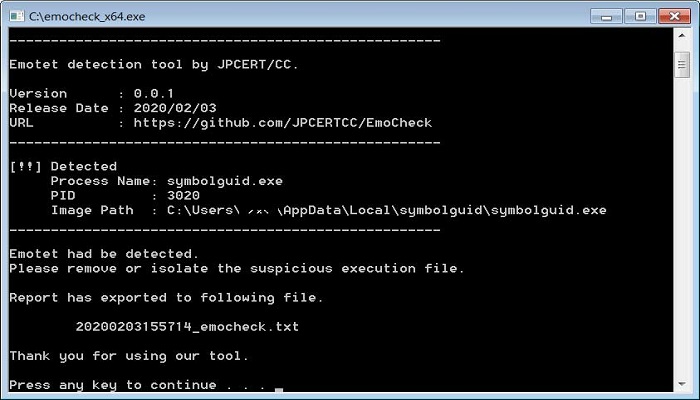
These details will also be stored in a log file located at [path of emocheck.exe] \\ yyyymmddhhmmss_emocheck.txt.
If you run EmoCheck and discover that you are infected, you should immediately open Task Manager and end the listed process.
Next, you should scan the computer with a reliable antivirus software to see if any other malware has been installed.
