

Gmail Sender Icons is a Chrome browser extension that adds domain information and icons to the lists of messages you receive via Gmail.
Gmail as we know it does not display any information about the sender of the email other than the selected name. However, the name is not the best indicator, as it can be freely chosen by the sender of the message.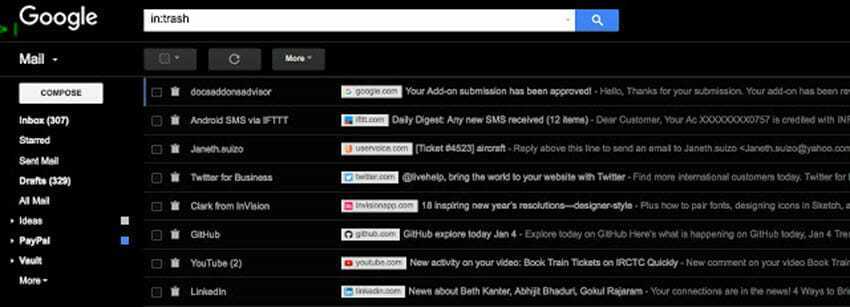
Gmail Sender Icons is a relatively simple Chrome extension. It adds the domain the message is being sent to and the domain's favicon to all Gmail emails. This allows you to check at a glance where the messages are supposedly sent from.
How does it work?
The Gmail add-on parses the domain from the address and pulls the favicon icon (often the same as the logo). It then adds the logo image and the company domain as a tag to the subject of the message, making it easier to identify the sender.
The extension is only available for Google Chrome at the moment. It may also work in other Chromium-based browsers.
Download the add-on
___________________
- Chrome password generation with built-in Password generation
- WHOIS protection removed from Greek registrars
- Microsoft GitHub: what happens now? Is the doomsday scenario correct?
- Microsoft: acquiring the GitHub code repository?
- Post tweets from the Chrome address bar
