

What is a PUA? Microsoft recently announced that it will add more means of protecting against the installation of so-called potentially unwanted applications (PUAs) to Windows Defender, but only for businesses.

The potentially unwanted applications protection feature is only available to enterprise customers. If you are already an existing Microsoft Enterprise customer, you will need to opt-in to enable and use PUA protection.
While Microsoft announced the new feature as exclusive only to Enterprise editions of Windows 10, it is not protecting the feature.
This means that any user (Home or Pro version) can enable and use the feature.
Protection updates for PUAs are built into the cloud and come along with Windows Defender updates.
Let's see how you can enable PUA protection in Windows Defender
Microsoft doesn't mention which versions of Windows support PUA protection in Windows Defender. We tested the feature on two computers running Windows 10 Home and Windows 10 Pro, and it worked without any issues.
You will need to add a registry key and preference to the Windows Registry:
Let's see how:
In Windows 10 search, type regedit and click the first icon that appears. This will open the Windows Registry Editor.
Confirm UAC if it appears
Follow the path:
HKEY_LOCAL_MACHINE\Software\Policies\Microsoft\Windows Defender
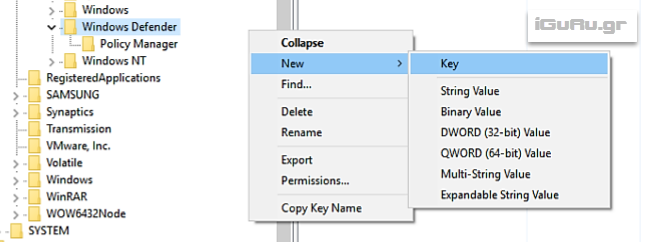
Right-click on Windows Defender and select New > Key.
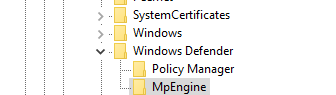
Name the key MpEngine.
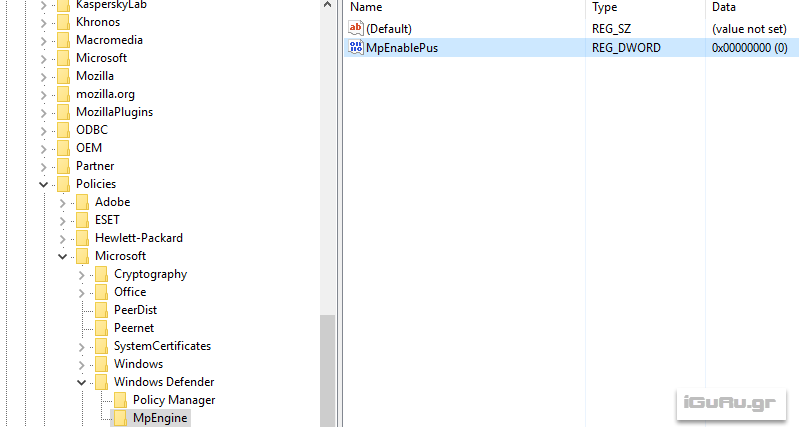
Right-click MpEngine and select New > DWORD (32-bit).
Name the DWORD value MpEnablePus.
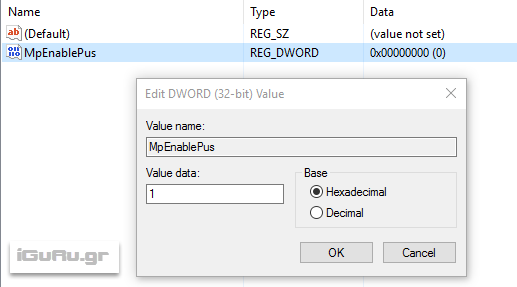
Double-click MpEnablePus and enter the value 1.
Restart your computer.
Once you have restarted your computer, Windows Defender will begin blocking potentially unwanted programs (installation and download via Internet Explorer or Edge).
If you now want to disable the feature, set the value in the DWORD registry to 0, or delete MpEnablePus completely.
