

Windows 8 and Windows 8.1 come with a secret hidden folder that contains all your installed apps, along with Modern apps, and the classic desktop app shortcuts. The operating system provides a quick way to open Modern apps from the desktop environment, however, it doesn't give us a shortcut, only a special shell command. Let's see how you can create a shortcut for this hidden folder so you can open it directly from the Start screen or taskbar.

You can open the Applications folder by typing the following shell command in the Run box on your computer. (To open the box, press Win + R together):
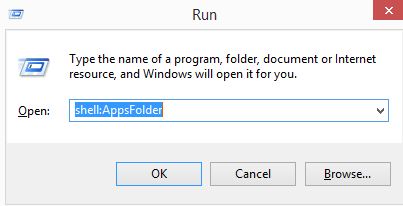
shell:AppsFolder
Wait until the hidden folder opens. Using this folder, it is easy to create a shortcut that will help you run any Modern app directly from the desktop.
To pin this useful folder to the taskbar or Start screen, you need to follow the simple instructions below.
Minimize all open windows with the Win + D hotkey.
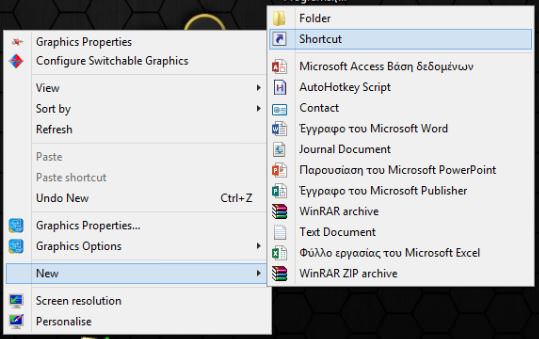
Right-click on an empty area of the desktop and select New – Shortcut to open the shortcut creation wizard.
Type the following in the wizard's text box:
explorer shell:::{4234d49b-0245-4df3-b780-3893943456e1}
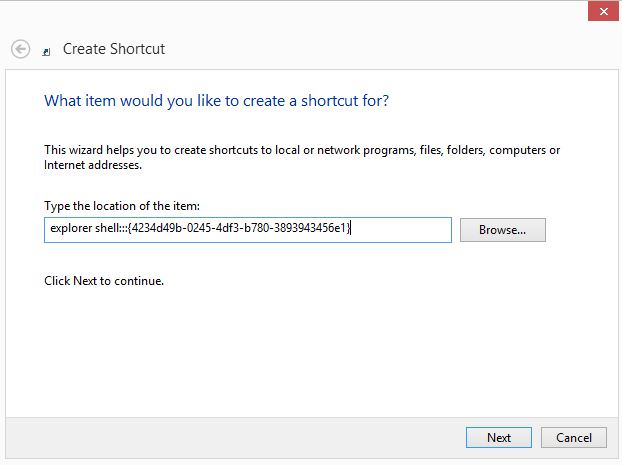
Click Next and complete the wizard steps and create the new shortcut (give it a name). When you are done and the shortcut is on your desktop, you can change its icon by right-clicking on it / Properties. In the window that will open Change Icon or Change Picture.
Now, right-click on the shortcut and select “Pin to Taskbar” or “Pin to Start”.
This tweak uses a standard Windows feature called “Shell Folder” to instantly open the item you need. Shell Folders are ActiveX objects that implement a special virtual folder or a virtual applet.
