

If you're afraid of losing your Instagram photos, or if you want to keep your personal archive, follow the steps.

Save to mobile
For privacy reasons , the Instagram app only allows you to download your own images. However, in the desktop browser saving method described below, you will see how to bypass this.
Instagram makes it easy for you to save photos you've taken, filtered, and edited within the app.
Open the Instagram app and go to profile .
Then, tap the three horizontal lines Menu icon in the top right corner of screen .
Once the menu appears as a pop-up, go to “Settings,” it’s the first option at the top of the list. Then, tap on the “Account” option, and then tap on the “Original Photos” option that will appear if you’re using an iOS. Android users will see the “Original Posts” option.
The Instagram app also gives you the option to automatically save all your images by enabling the “Save original photos” option.
Save via desktop browser
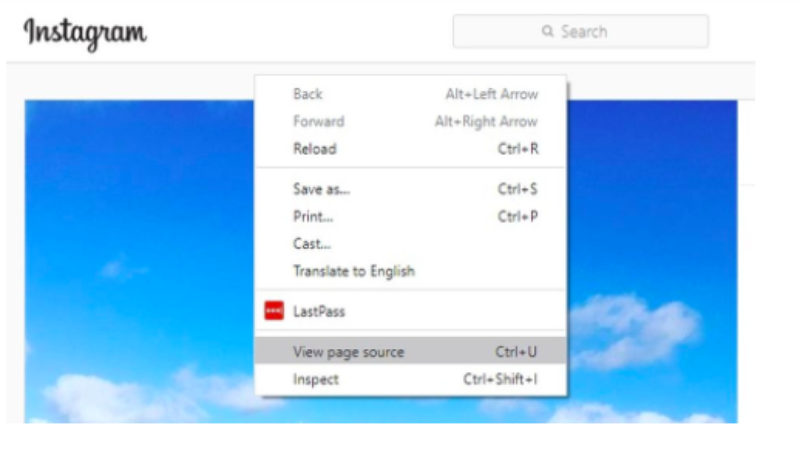
To download any of the photos on Instagram, open the image of your choice in a new browser . Then, go over the image and right-click with your mouse or any other connected device you have at your disposal. When you click, a pop-up menu will appear and you will select “View Page Source.”
This will automatically bring up the page's source code in a separate browser tab. Scroll down the code, or use your browser's "Find" tool, until you see the first link with the ".jpg" suffix on that page.
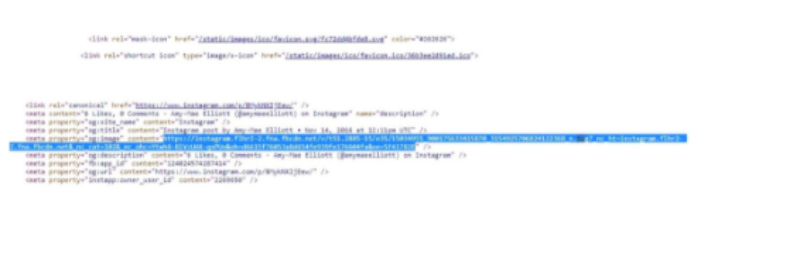
Copy only the text of the URL that appears between the two dialogues or quotes. Then paste the URL into another new browser tab. Once the image has loaded, you can right-click to download it to your computer just like you would a regular photo online.
