

As we mentioned in previous posts, the Windows 10 20H1 update will feature a “Cloud Download” feature. The new feature will download the latest Windows files from Microsoft and use them to reinstall Windows.

Microsoft's Aaron Lower explains exactly how Cloud Download will work.
In a post on Microsoft's Windows Insider blog, Lower recounts the history of Windows 10's built-in restore options, and explains how Windows 10's built-in Cloud Download restore will work:
The next major improvement in Windows 10 is “imageless” recovery. This is done by building a new copy of Windows from your existing installation. Because this approach doesn’t use a recovery ISO, it saves disk space and keeps the latest security updates. Older approaches took more than 45 minutes and might not always repair Windows if the installation is in a very bad state or is too corrupted.
This is where Cloud Download comes in.
Besides requiring extra time and a Windows installation, the ability to recover without an ISO has another problem: If you haven't installed the latest Windows updates, you'll have to install them after restoring the system.
The new Cloud Download feature avoids these drawbacks. Instead of using all the files it needs from your hard drive, Windows can download the latest Windows installation files from Microsoft's servers.
This will give you the latest files, so no major updates will be required after reinstalling Windows. It's just like creating a USB drive with the latest version of Windows 10 and reinstalling from it, but you don't have to bother with creating installation media.
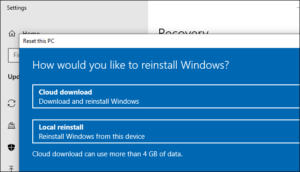
To use this feature in the Windows 10 20H1 update – which is currently in development – open Settings > Update & Security > Recovery and click “Get Started” under Reset This PC.
After choosing to keep your files or remove everything from your computer, you can select “Cloud Download” to download the installation files from Microsoft servers or “Local Reinstall” to use the local files on your system.
What happens during the restore process:
Windows will download the files it needs and then restart into Windows RE (Windows Recovery Environment). The installation process will gather all the drivers from your current Windows system, ensuring that your hardware will continue to work.
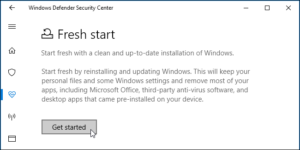
It will also “Apply OEM customizations, along with adding pre-installed Windows apps”, so you will probably see all the bloatware that your manufacturer has installed on your computer. You may need the Fresh Start feature for this (Settings – Update & Security – Recovery and click on “Learn how to start fresh with a clean installation of Windows”).
Cloud Download will also be available in the recovery environment that appears if you can't start your PC. You'll be able to use the "Reset this PC" feature to download new files from Microsoft and reinstall Windows, even if Windows is damaged and won't start.
Lower says that wireless connectivity in the recovery environment can be a problem, and it depends on whether the computer manufacturer loads the drivers that can enable it or not.
