

Most Windows 10 users are happy with the default black and white mouse pointer and its size. In fact, a large number of users are unaware that Windows 10 allows you to change the default pointer size and color.

Until now, Windows 10 only offered black and white for your mouse pointer. And three sizes of it. If you wanted a change, you had to install a third-party program.
With Windows 10 build 18298, which is currently on the fast ringers, things have changed and you no longer need to ask for outside help to set a custom color for the mouse pointer. Microsoft has added a built-in option, which allows you to set your own color for it. Let's take a look.
Set a custom mouse pointer color in Windows 10
Step 1: Open the Settings app. Go to Ease of Access > Cursor & Pointer.
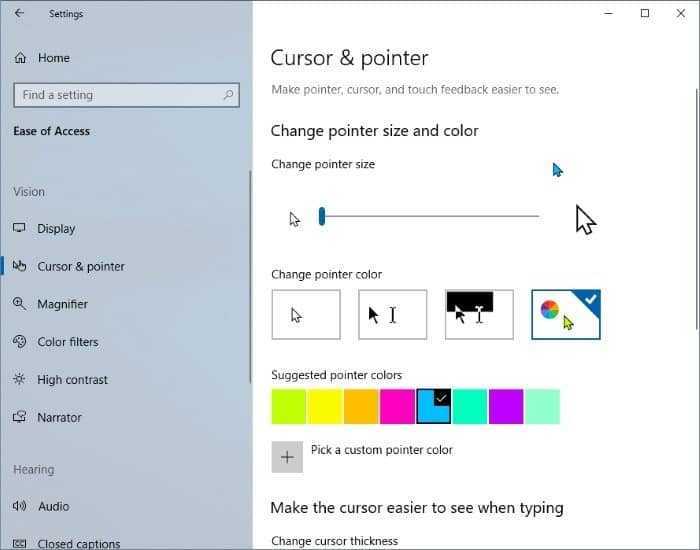
Step 2: In the Change pointer size and color section, select the multi-colored pointer (last), and then select one of the eight suggested colors. If you need to set a custom color, click “Pick a custom pointer color,” select a color of your choice, and then click Done.
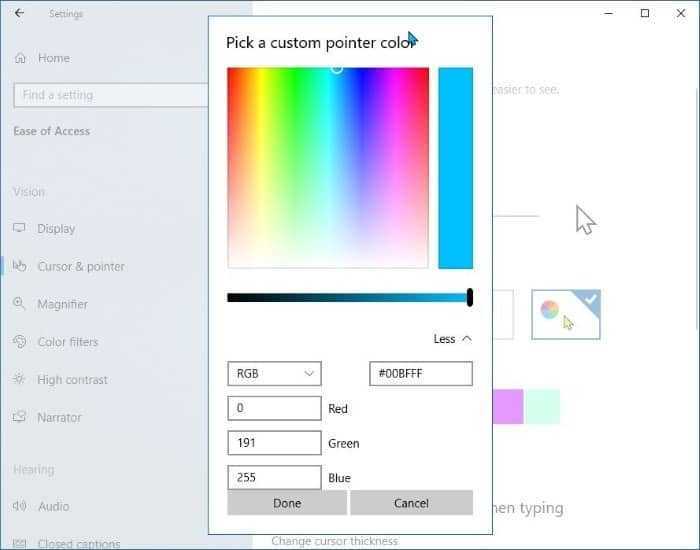
Note that you must select the multi-colored marker to reveal the additional color options. The color options for the marker are hidden when a black or white marker is selected.
If you don't see all of this in your settings (as shown in the image above), then you are definitely not running Windows 10 build 18298, meaning you are not a fast ringer, and you will have to wait until April for this version to be downloaded for regular users.
As you can see in the images above, you can also adjust the size of the mouse pointer from the same settings area.
