

Canonical is adding a new feature to its upcoming Ubuntu 18.04 LTS (Bionic Beaver) operating system, which will be released this spring in late April, allowing users to install a minimal and unbloated Ubuntu operating system on their computers.
The feature is called “Minimal Installation” and is aimed at those who need it on Ubuntu’s “Preparing to install Ubuntu” screen, right after choosing a keyboard layout. As you might imagine, the option is disabled by default.
Enabling it will install Ubuntu with a minimal desktop environment consisting of a web browser and the standard utilities.
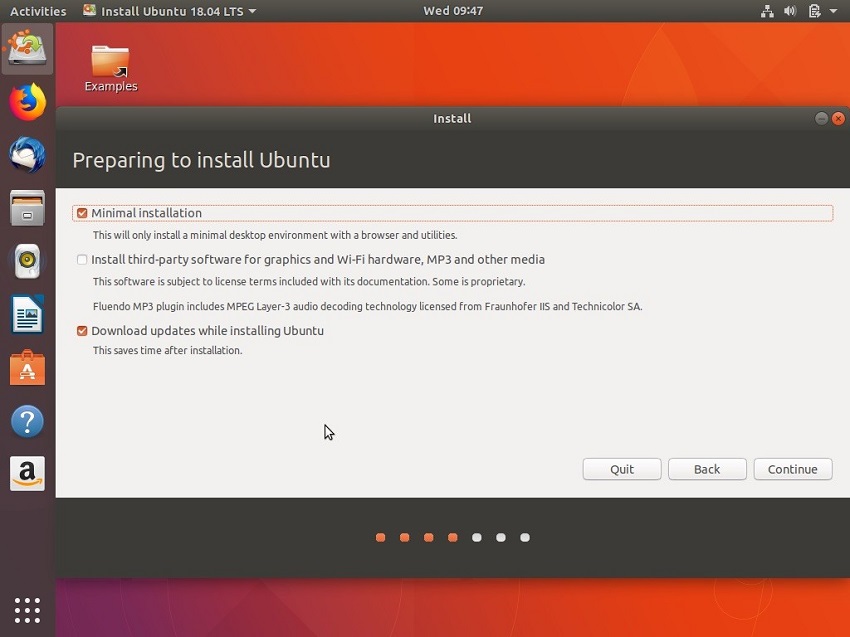
After installing Ubuntu 18.04 LTS (Bionic Beaver) using the Minimal Installation option, you only get a bunch of applications, including Mozilla Firefox and a few GNOME applications like Terminal, System Monitor, Calculator, Gedit, Evince, and Videos (Totem).
Among the services included in the Minimal Installation version of Ubuntu 18.04 LTS, we can mention Software Updater, Software & Updates, Startup Applications, Power Statistics, Input Method, Archive Manager, Characters, Font Viewer, Screenshot, Logs, as well as Passwords & Keys.
Most of these utilities are grouped into a “Utilities” folder for easy access and also to keep the GNOME app drawer clean. As expected, this version of Ubuntu takes up less space on the drive.
If you want to try the Minimal Installation option, you can download the latest ISO of Ubuntu 18.04 LTS (Bionic Beaver). Please note that the operating system is still in development and some things may not work as expected. Ubuntu 18.04 LTS launches on April 26, 2018.
📧
Subscribe to the SecNews Newsletter
