

Each Google account has some free storage space, but if that isn’t enough you can purchase more. Regardless of how much space you have, you’ll probably want to monitor how much space you use. We’ll show you exactly how you can check your available storage space.
See also: YouTube: Your channel name changes but not your Google account
How to check storage space
Checking how much storage you have left is easy. Just go to drive.google.com/settings/storage. If you're a Google One subscriber, you'll be automatically redirected to the appropriate page.
See also: Google: Ordered to provide information on alleged cyber-bullies!
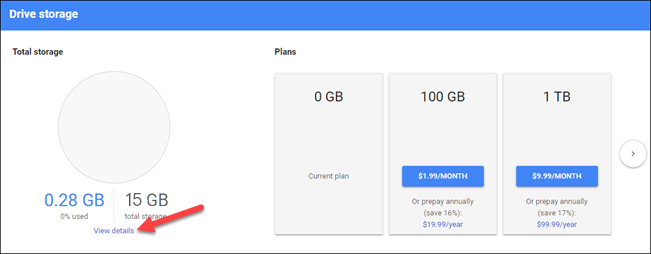
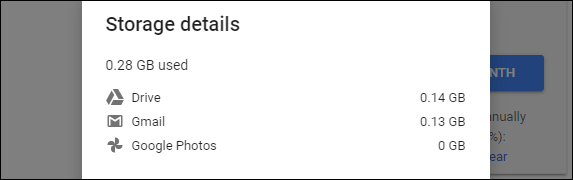
Anyone using the free storage space of a Google account will see the chart below. Select “View Details” to see the full analysis.
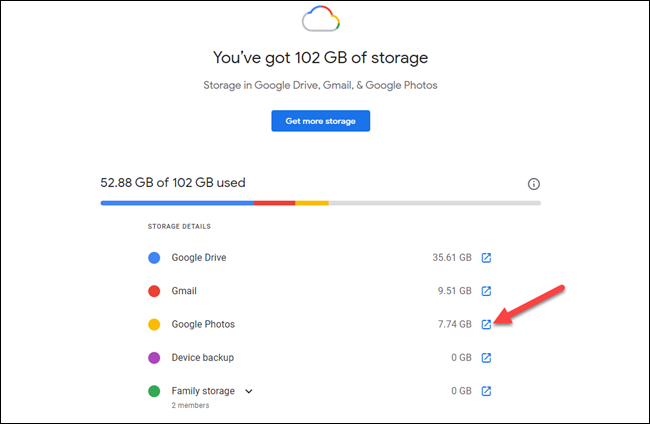
Google One subscribers will see an analysis similar to this one. Select the icon with the arrow next to a section to go directly to that service and manage the storage space.
See also: US Senate: Companies blame Apple/Google for their store policies
You're all set. In both cases, there are links that will take you to Google One storage plans if you need more storage. This is a good, simple way to keep track of all the storage you 're using.
Source of information: howtogeek.com
