

Sleep Mode is a new Firefox browser extension that hibernates all tabs except the active tab. This frees up memory, saves battery, and can speed up other functions.

Firefox users who like to open many tabs have certainly noticed that memory usage is increasing rapidly. Depending on the available resources of each computer, especially memory and battery, users may see anything from constant crashes to slow operations.
Third-party tools and browser extensions can help automatically, semi-automatically, or manually tweak Firefox's memory usage. But because of all these extensions, Firefox hasn't gotten a major upgrade designed to improve memory usage.
The new Firefox 67 may be able to automatically suspend tabs you're not viewing, as Google Chrome has been doing since 2015.
Sleep Mode is a simple extension that can be very useful in some situations. Upon installation, the extension adds an icon to the main Firefox toolbar that you can interact with.
The icon acts as a toggle button. One click initiates sleep mode. Any tab, except the active tab and tabs that are not fully loaded or not loaded at all, will be put into sleep mode to free up memory and improve power consumption and system performance.
Sleep Mode removes the website from memory and adds the word “Sleep Mode” to the beginning of the web page title. This feature, and depending on how many tabs you have open, can hide the entire page title, making it difficult to identify each page.
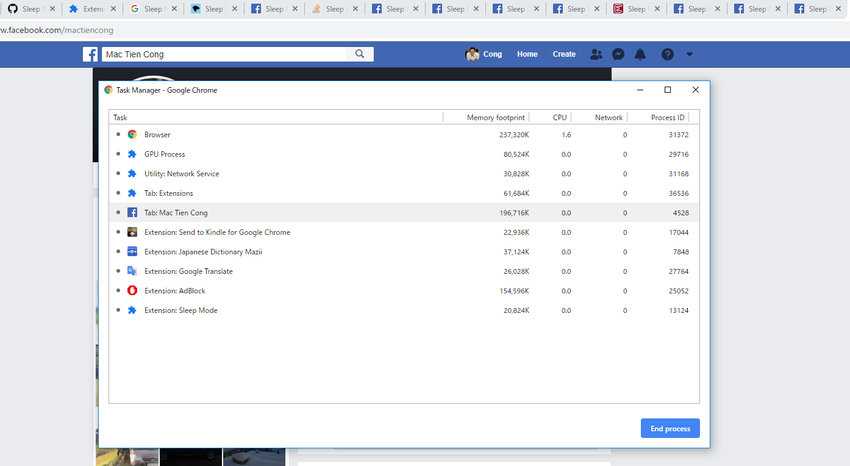
Clicking the Sleep Mode icon again will return Firefox to normal mode. Any websites that haven't loaded will be reloaded. You may need to switch to some tabs to complete the loading process.
So far, third-party extensions are the only solution to reduce memory usage in Firefox. Although it seems that we can expect big changes with the arrival of Firefox 67 on May 14, 2019 in the stable channel, which is currently already available in Firefox Nightly. We already know that we will see changes aimed at memory usage, such as offloading memory for tabs with audio playing, but also security changes such as prohibiting extensions in private windows.
