

Microsoft has released Windows 10 October 2018 Update or version 1809 with new features and improvements.
Microsoft's latest update, for example, brings the integration of the Your Phone app, but the new program "Cloud Clipboard." It also appears to add some improvements to existing tools, such as the Disk Cleanup tool.
Microsoft has updated the Disk Cleanup tool with a new option that will help you free up more space on your disk.
The Disk Cleanup utility also has a new option to clean up the Windows Downloads folder. Yes, the “Downloads” folder is in the cleanup options and apparently it is not selected by default. 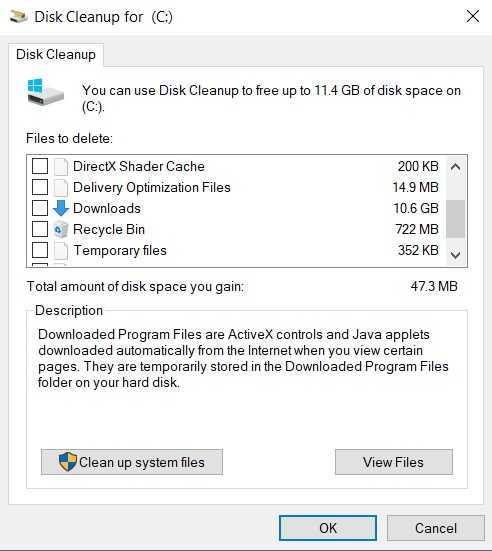
However, if you are not careful in case you want to use the tool, and you check all the “boxes”, Windows will delete the entire folder with the downloads.
It should be noted that Microsoft plans to retire the Disk Cleanup tool in a future release, so the tool is not expected to receive new features after the release of Windows 10 October 2018 Update.
The Disk Cleanup tool is already listed as “Free up Space Now” and is located in the Settings page. You can find Free Up Space Now under System – Storage – Free Up Space Now.
________________
- Snipping Tool: Microsoft announces the end of the application
- Microsoft stopped updating Windows 10 October 2018
