

Are you having trouble charging your Android phone? You are not alone as it is one of the most common problems faced by many Android users.

In this article you will find the steps you need to follow, before you start panicking, to identify the cause of your Android phone not charging and what you can do to fix it.
1. Try a simple restart
Turn your Android phone off and then back on. Before you start doing anything else to fix your problem, this is the first solution you should try. Some apps running in the background can affect the battery. By restarting your phone, you force your device to work without these apps.
2. Try another charging cable

The charging cable is a very common cause of charging interruptions. The kinks it makes during use can break the continuity of its internal connections or its internal wiring. There's a good chance you have more than one cable somewhere in your drawers, from other devices that have the same type of connection port, so try changing the cable to see if that's the problem.
3. The USB port needs repair

Constant plugging and unplugging may have dislodged some of the metal surfaces inside the USB port. If this happens, then good contact is not being made and your phone will obviously not charge or will charge very slowly.
Turn off your device and remove the battery. Have a friend shine a flashlight into the port continuously to see better, and with a toothpick (or something equally small), pry up the small pins in the port. Be very careful when doing this to avoid causing permanent damage.
4. The charger is not working
If you have a charger that can be separated from the charging cable, then this is another possibility and cause of failure. Constantly removing the cable can cause damage to the USB port. But the charger itself, as an electronic device, can also burn out at some point. To check if the charger is problematic, try another charger.
Ask a friend to try theirs, or you can always buy a new one. You can also try connecting your device to your computer. If it charges, then buying a new charger seems like a very good idea.
5. Is it time for a new battery?

Over time, your poor battery care can be a factor in your battery's decline. Sooner or later, you'll need to replace your battery, but bad charging habits can speed up the process. If you can't replace your battery yourself, this could be the perfect excuse to finally get that phone you've been eyeing for a while.
Obvious signs that you need a new battery are if it's slightly swollen or cracked somewhere. Remove the battery and place it on a flat surface and try to turn it over. If it wobbles (or wobbles), even a little, it's time for a new battery. Another sign that your battery is dying is when it won't hold a charge any longer. Or when the battery life drops from 100% to 50% right after charging. If your Android phone comes with a built-in battery that isn't easily removed by hand, you'll need to take it to a local repair shop that has the tools to change it.
6. Clean the ports
You'd be surprised at how much dust and crumbs can get into your phone. Cleaning electronic devices in general is essential, and the lack of it is a common cause of damage.
If you can, use a can of compressed air to remove dust and debris. If not, try blowing hard with your mouth on all the ports. It may help remove the bits of smoke from your cigarettes that have settled in there.
7. Install Ampere
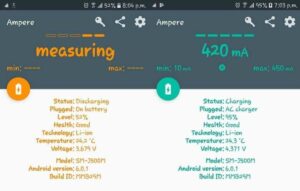
To know if your Android phone is actually charging, try installing the Ampere app. It's free from Google Play and gives you all sorts of information about the health and performance of your battery. You can see how much power it's drawing during processing, the manufacturer ID, Android version, temperature, and whether you're running on battery or an AC charger.
8. Use the original charger
It’s something we’re all guilty of. You can’t find your new charger, so you grab your old phone charger just because the plug fits. But chargers meet certain voltage and amperage specifications for each phone.
If you don’t use the original charger, you may find yourself with a slow charge, or your phone may not charge at all. There are some phones that won’t charge or boot up if you don’t use the original charger. Also, some phones can take up to fifteen minutes to show you that they’re charging.
Conclusion
Not being able to charge your device is a problem that everyone will encounter sooner or later. Thanks to these helpful tips, you will be prepared on how to handle the situation. If we forgot any additional tips that you find useful, leave a comment on this article to share it with us.
