

System Font Changer is a free program for Windows designed to help you restore font changing functionality on computers running Windows 10 Creators Update.
The Windows 10 Creators Update came with a ton of new features, but if you look closely, you'll notice that some of its features were removed.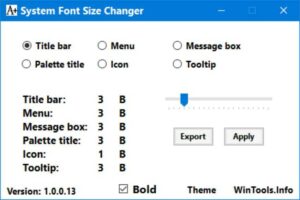
One of the features that has been removed from the Windows 10 Creators Update is the ability to change system fonts.
The feature remains available in the Registry, and allows you to control to modify system fonts, something that was removed after the update.
In order not to tamper with the Windows registry by hand, System Font Changer was released today, a portable program for Windows that will give you the feature that was removed without having to make tweaks by hand, and without having to install it.
Although it is specifically designed to restore lost functionality in the Creators Update, the application also supports all previous versions: Windows 10, Windows 7, and 8.1.
The program asks you to save the current font settings used by your system, so that you can restore them later if you don't like the result.
The application then shows you the options you have for changing the font:
Title bar.
Menu.
Message box.
Palette title.
Icon.
Tooltip.
The new font will not appear immediately after your command. You will need to log out or restart your computer to see the changes.
Download the app
Version: 1.0.0.14 | Date: 2017-04-11 | Download | MD5: 27acb46ef7485eda3c6443f804d86c34
