

Restoring tab groups in Chrome will soon be a lot easier. Right now, when you close a group by right-clicking on the group header, each tab in the group appears as a separate entry in the recently closed tab. If you accidentally close a group, there’s no way to completely restore it with a single click. You have to restore each tab one by one to recreate the group. However, Chrome will soon let you reopen the entire group with a single click.

As pointed out by Reddit user u/Leopeva64, in the latest version of Google Chrome Canary, closed tab groups now appear as a single unit in the “recently closed” drop-down menu.
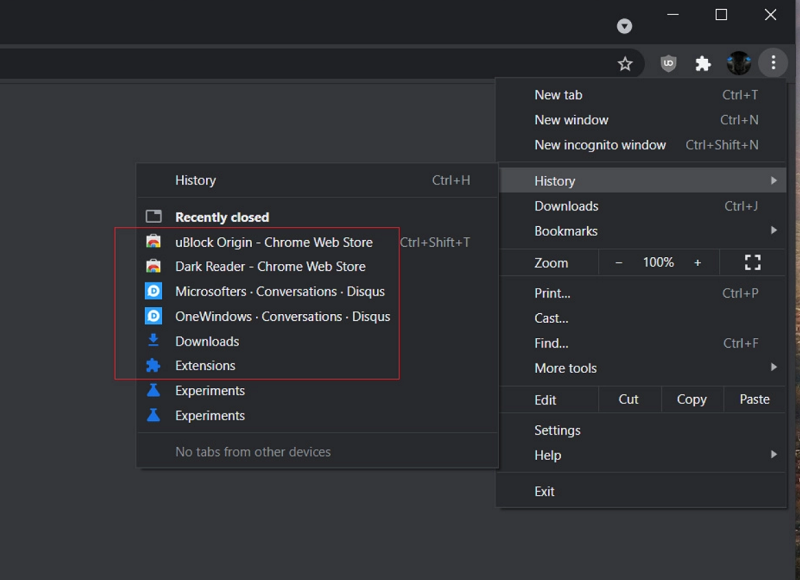
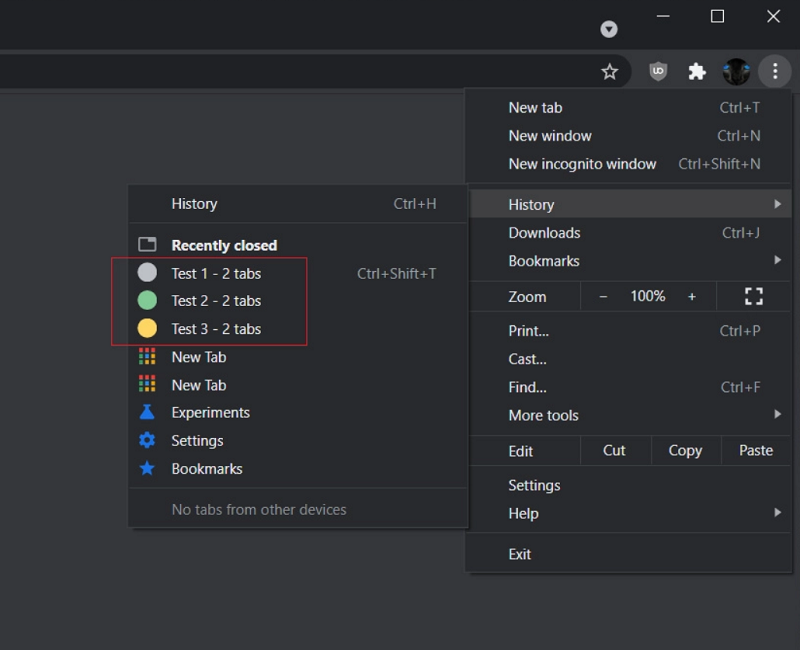
When you close a group, it will appear as a single item instead of each tab appearing separately, making it possible to restore the entire group with a single click – or by pressing Ctrl + Shift + T.
See also: Google Chrome: How to enable “Enhanced Safe Browsing”
Essentially, you'll be able to restore tab groups the same way you can restore a closed browser window with all previously open tabs.
See also: How to disable the "Apps" button in Google Chrome
The tab grouping feature was released last year. As the name suggests, the feature allows Chrome users to group different tabs in the browser, reducing clutter and making it easier to find related tabs quickly. Users can right-click on a tab to create a group, and can even assign a name and color scheme to it.
See also: Google Chrome for desktop will receive a major improvement
The quick restore groups feature is available in the latest version of Google Chrome Canary for desktop. It works without having to enable any flags. If you’re interested in trying out the feature, you can download the latest build from here. We don’t know when the feature will reach the stable channel of Chrome, but we’ll keep you posted when it does. Tab grouping has been a very handy feature, and with this new improvement, it’s set to get even better.
Information source: xda-developers.com
