


Fix it is a PC troubleshooting solution that lets you find and fix your Windows issues quickly with just one click. It is a set of automated troubleshooting solutions based on the Microsoft Automated Troubleshooting Services (MATS) engine.
It allows you to run these troubleshooters directly from your browser. And that's very useful. Almost all of the Fix it solutions are available for download for offline use and provide repair instructions.
Another great thing about troubleshooting and fixing problems with Fix it is that you can install and run it portable. The solution database and the engine can be placed on a USB flash drive. Just follow the simple instructions below.
Portable Microsoft Fix it will include solutions from the following categories:
- Aero
- Play audio
- CDs/DVDs
- Codec
- Screen quality
- Exchange
- File folder
- Firewall
- Games
- Internet Explorer Add-On
- Internet Explorer performance
- Maintenance
- Malware Prevention
- Media Player Device
- Microsoft Installer (MSI)
- MSN Client
- Performance
- Photo slideshow
- Force
- Printer
- Research
- Safety
- Recording
- USB
- Windows Phone
- Zune
To get the Fix it, do the following:
- Click here to download Fix it portable. This is an official download from Microsoft.
- Run the "MicrosoftFixit-portable.exe" file you just downloaded.
- Accept the license terms and specify a folder where Portable Microsoft Fix it will be downloaded.
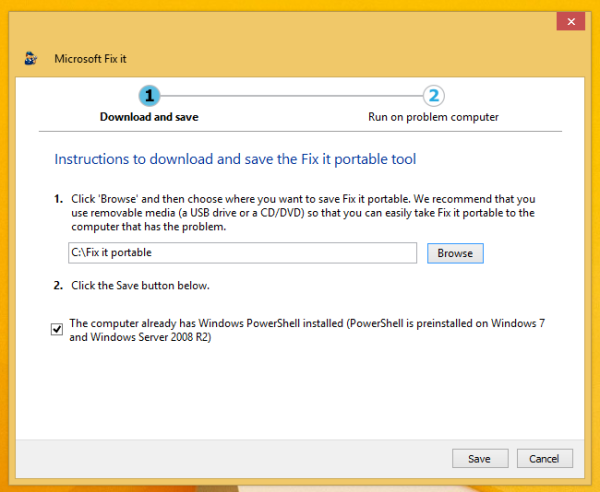
- Wait until the download is complete. You will download approximately 40 MB.
- After completion, you will find a folder named Fix It portable inside the location you specified in step 2.
- In the “Fix it portable” folder, there will be a file “ Launch Fix it.exe ”. Run it to start the portable version of Microsoft Fix it.
Great!. Now you have the Microsoft Fix it portable version that is made for a USB flash drive or CD. You can copy the folder to a USB or burn it to a CD.
Source: secnews.gr
