

Microsoft is strengthening the security of the Microsoft Teams by automatically warning users about malicious links in messages.

The new feature, part of Microsoft Defender for Office 365, is designed to protect users from phishing, spam, and malwareby flagging potentially harmful URLs shared in internal and external conversations.
The update will start being available in public preview for corporate customers in early September 2025, with global general availability expected to be completed by mid-November 2025.
The feature will be available for Microsoft Teams on desktop, web, Android, and iOS platforms.
See also: Signal: Secure backups to save & restore conversations
Increased phishing attacks require new protection measures
To address the threat of phishing attacks within collaboration tools, Microsoft Teams will display a warning banner on any message that contains a URL that Microsoft’s threat systems identify as malicious . The system scans the links to determine if they pose a risk. When a user receives a message with a flagged URL, a clear warning directly within the conversation will appear .
This warning system also informs the sender that a shared link has been flagged as potentially harmful, allowing them to edit or delete the message.
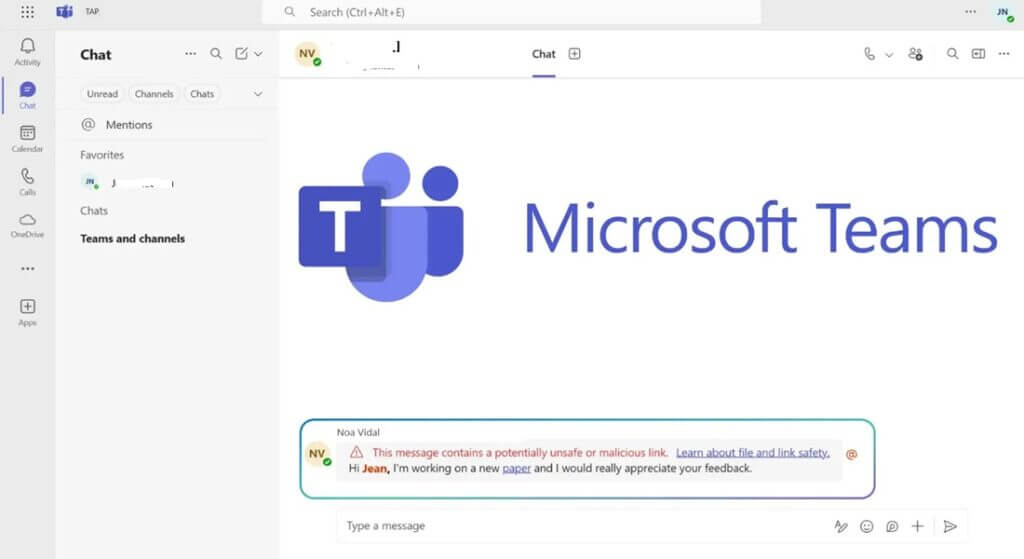
A key element of this feature is its ability to re-examine URLs even after a message has been delivered. If a link is identified as malicious up to 48 hours after delivery, the system will recursively apply a warning banner to the message, a process known as Zero-hour auto purge (ZAP).
Microsoft Defender and security in Microsoft Teams
This new warning system complements existing security measures in the Microsoft 365 ecosystem. It works in conjunction with Safe Links, a feature in Microsoft Defender (for Office 365), which provides click-time verification to protect users from malicious links. While Safe Links offers protection when you click a link, the new message warnings provide an early layer of defense, warning users before they interact with the URL.
See also: Microsoft Patch Tuesday September 2025: 81 Vulnerabilities Fixed
The feature also integrates with ZAP, which can block messages entirely. If ZAP is configured to block a message that contains a known malicious URL, this action will override the warning banner.
Protection of organisms
For organizations, this layered approach creates a stronger defense against link-based threats, which are increasingly common in collaboration platforms like Microsoft Teams. The malicious URL protection feature will be enabled by default once it reaches general availability in November 2025.
During the public preview period starting this month (September), admins will have to choose to enable the alerts themselves. IT admins can manage the feature settings through the Teams Admin Center, by going to “Message Settings” or through PowerShell commands. This allows organizations to configure their protection to match their specific security policies.

Administrators are encouraged to review these settings, update any internal documentation, and inform their support teams about the new functionality to ensure a smooth rollout.
See also: Chrome update fixes critical RCE vulnerability
This update represents a significant step for the security of communications of active Microsoft Teams users, who exceed 320 million monthly.
Microsoft's move to introduce dynamic warning banners in Teams shows how collaboration tools are becoming a key area of defense. In an era where cybercriminals target human error, timely information before the "click" is critical.
