

A common spam tactic on Instagram is a fake account adding you to a group chat. Unfortunately, depending on the type of account you have, you may not be able to prevent this from happening. Here's what you can do!

If you have a professional Instagram account
If you have a business profile on Instagram, you're in luck. You can control who can add you to groups.
See also: Facebook: Creates a version of Instagram aimed at children
To do this, open Instagram and go to your profile. Tap the menu icon in the top right corner.
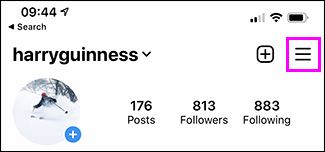
Tap “Settings” in the menu.
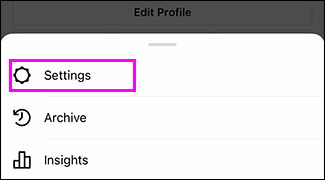
Tap “Privacy” on the Settings screen.
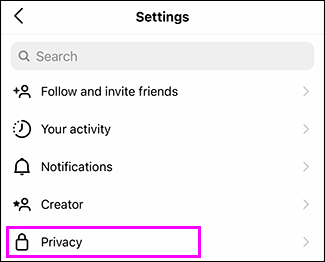
Tap the “Messages” option on the privacy screen.
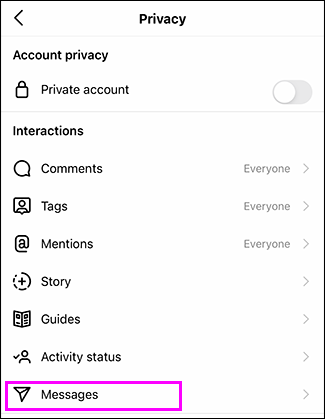
Click “Only people you follow” in the “Allow others to add you to groups” section.
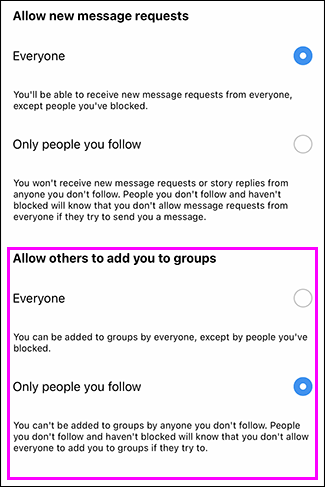
Now, only accounts you follow will be able to add you to group conversations.
See also: Instagram: The most "intrusive" application, according to research!
If you have a personal Instagram account
If you have a personal Instagram account like most people, there's currently no way to prevent someone from adding you to a group — even if your account is private.
Instead, you have three options:
- Turn off notifications for group requests.
- Leaving the group.
- Block the account that added you.
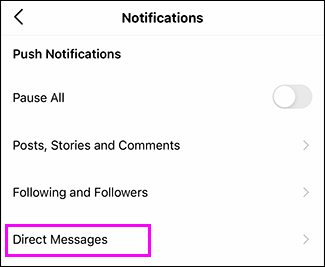
To turn off notifications for group requests, go to your profile, tap the menu icon in the top right corner, then tap Settings > Notifications > Direct Messages.
In the Group Requests section, click “Off”.
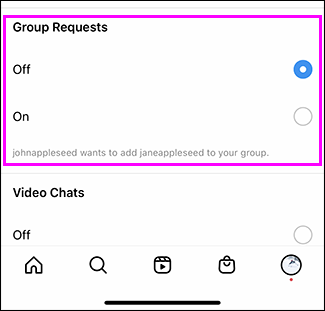
Now, at least when someone adds you to a group, you won't get a notification.
See also: Instagram: It will "prevent" adults from sending messages to teenagers!
To leave a group conversation, first, tap the “i” icon in the top right corner of the conversation.
Tap “Leave Chat” below the list of chat members, then tap “Leave.”.
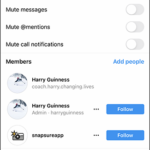
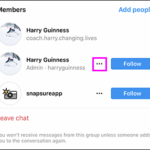
If you want to block the account that added you, first, tap the three small dots next to the account name in the Members area.
Press “Block” to block this conversation.
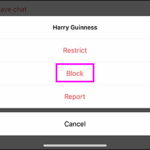
This will stop the spammer from adding you to the group again.
Information source: howtogeek.com
