

The world of Wi-Fi is awash with a ton of symbols and names. Have you heard of 802.11ax, 802.11ad, 802.11ac, 802.11n, and other confusing numbers? Or have you heard of Wi-Fi 6, Wi-Fi 5, WiGig, and wondered if they speak English or Chinese? Let's take a look at what they all mean.

We live in the era of the internet and wireless connections, and most people use a wireless router in their homes. And while cables are slowly receding into the dustbin of history, wireless connection appears with a bunch of innovations, techniques and names. Wi-Fi, a type of wireless communication, has become a common term in our vocabulary. It is present in almost all routers, TV boxes, as well as in all devices that require a connection from a distance greater than ten meters that Bluetooth covers.
So you see, if you want a wireless connection longer than 10 meters that can penetrate walls, then Wi-Fi is the way to go. But even though we hear the name Wi-Fi almost everywhere and every day, its wireless networking standards are not easy to digest and understand. They have complicated names, which their clever inventors had some trouble naming.
Do you know what 802.11ax is? What about 802.11ac, 802.11ac Wave 2, 802.11n or 802.11ad? Have you heard somewhere that these alphanumeric symbols have been renamed to Wi-Fi 6, Wi-Fi 5 or Wi-Fi 4? Do you want to understand what all this means and what importance they have when buying a wireless router or a new laptop? If you like knowledge, read on.
Before we begin the analysis, let's first make sure you know the basic concepts you will encounter:
- Data transmission speed: This refers to how fast a source can transmit data to a receiver. It is measured in Gbps, which is how many millions of bits per second
- Wireless signal range: How far you can “catch” a Wi-Fi signal. But also how easily that signal passes through walls and other obstacles. It is measured in meters.
- Signal frequency: It is how fast or slow the pulse of a wave is transmitted. Imagine a vast calm sea where you throw a stone and circular waves form around the point of its fall. How close or how far apart these waves are from each other is called the wave frequency. It is measured in Hz (hertz) and indicates how many waves have passed a point in one second.
What is 802.11n, also known as Wi-Fi 4?
802.11n is just a nickname, and in fact, its full name is IEEE 802.11n-2009. It's a wireless networking standard that was published in 2009. Wi-Fi 802.11n, because someone thought it was a bit difficult to pronounce, also dubbed it Wi-Fi 4.
This is what most old wireless networks in Greece work with, given that the devices in every home have a 5-year lifespan. Those who have renewed all their wireless equipment after 2015, and have paid a little more, may be working on the next standard (208.11ac).
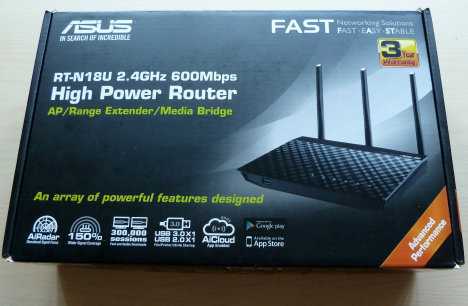
ASUS RT-N18U – a wireless router using the 802.11n standard
The 802.11n standard operates in the 2.4 GHz and 5 GHz radio frequencies and can provide data transfer speeds of up to 600 Mbps (0.6 Gbps). Wi-Fi 802.11n was also the first wireless standard to offer support for MIMO (multiple-input and multiple-output). MIMO is a technology that allows multiple antennas to be used to transmit more data by combining independent data streams. In short, you have a machine with many antennas, like a horned monster, that can transmit multiple streams of data at the same time.
What are 802.11ac and 802.11ac Wave 2?
802.11ac or IEEE 802.11-ac is a wireless networking standard published in late 2013. Wi-Fi 802.11ac is also known as Wi-Fi 5.
802.11ac is the most common wireless standard today, with most routers sold in recent years being 802.11ac-compatible. This standard, like its predecessor 802.11n, supports MU-MIMO (Multi-User MIMO) and can deliver peak data rates of up to 2.3 Gbps. 802.11ac only operates in the 5 GHz band, but most wireless routers that support it also offer support for 802.11n in the 2.4 GHz band.
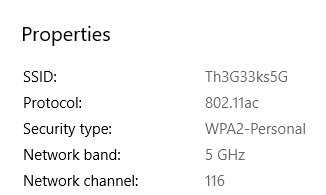
The properties of a wireless network using 802.11ac
802.11ac devices are divided into two categories called 802.11ac Wave 1 and Wave 2. Products sold under the 802.11ac Wave 1 standard were introduced to the market in 2013, while those in Wave 2 were introduced in 2016.
As you can easily understand, 802.11ac Wave 2 is an improved version of the 802.11ac Wave 1 standard. 802.11ac Wave 2 wireless routers have higher performance and add support for MU-MIMO. And while Wave 1 routers can provide speeds of up to 1.3 Gbps, Wave 2 routers can provide speeds of up to 2.3 Gbps. So if you're buying a wireless router today, it's a good idea to check that it offers support for 802.11ac Wave 2, to take advantage of the improved wireless speed and coverage.
What is 802.11ax?
802.11ax , or IEEE802.11ax, is a wireless networking standard that is in the final stages of development and has not yet been approved. It is expected to be finalized and approved sometime in late 2019, according to ZDNet: Next-Generation 802.11ax Wi-Fi: Dense, Fast, and Lag-Free
802.11ax is also called Wi-Fi 6. It is also known as High-Efficiency Wireless and is designed to operate in the same 2.4 GHz and 5 GHz frequency bands. It appears that it will also be able to work with additional bands between 1 and 7 GHz, when they become available by international legislation.
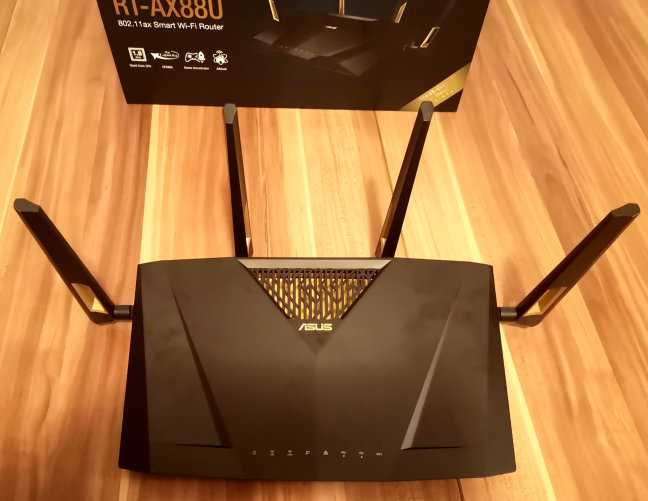
ASUS RT-AX88U – The first consumer wireless router with support for 802.11ax
The 802.11ax wireless networking standard aims to improve average data transfer speeds by up to 4 times over the 802.11ac standard. It should offer significantly improved wireless speeds, especially in busy areas like airports, restaurants, coffee shops, and so on.
What is 802.11ad?
The IEEE 802.11ad wireless standard is a wireless networking standard that is also known as WiGig or Wi-Fi 60 GHz.
The 802.11ad standard is a form of Wi-Fi that instead of using traditional wireless frequency bands, such as 2.4 GHz or 5 GHz, uses a microwave portion of the radio spectrum, around 60 GHz.
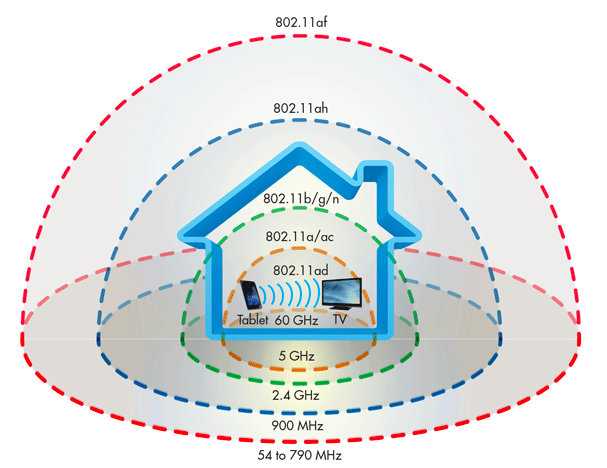
It allows for incredibly fast data transfer speeds of up to 7 Gbps. However, because it operates at a microwave frequency, it has the significant disadvantage of not being able to pass through walls and has a range of only 1 to 10 meters. It's very fast, but it's designed to only cover your living room, when there are no walls or obstacles.
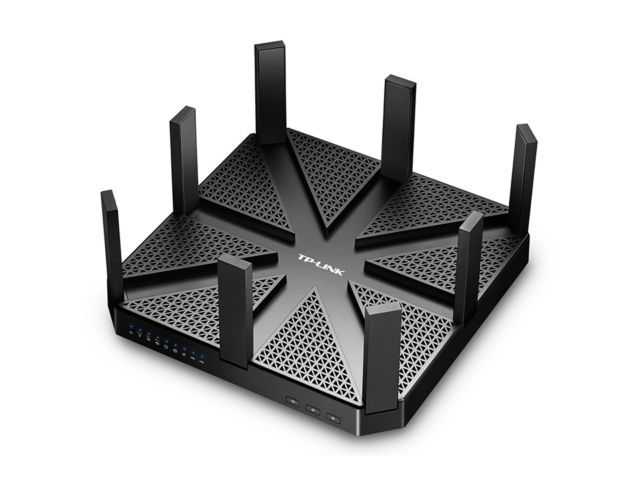
TP-Link AD7200: A router with WiGig support
In short, it has the range of a Bluetooth but with the ability to simultaneously serve multiple data streams and at the highest speed available in a wireless network.
To better understand the range of each standard wireless network, see the image below depicting a typical home:
What is Wi-Fi 6, Wi-Fi 5, Wi-Fi 4 and so on?
On October 3, 2018, the Wi-Fi Alliance announced that it had added a new name to the core wireless networking standards to make them easier for people to recognize. It makes sense, since 802.11ax, 802.11ad, 802.11ac, 802.11n, and all the other similar names are not easy to remember and most people have no idea what they mean, and worse, the letters in the names don't follow the chronological order of the technology's evolution.
Their way of thinking is that the word Wi-Fi followed by a number is easy for someone to remember and the rule is that the higher the number, the newer and the better the standard.
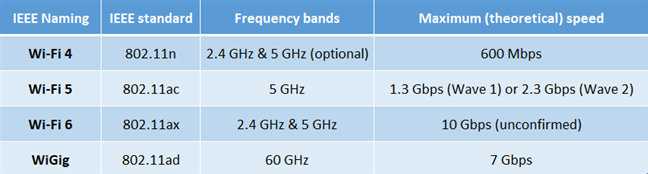
If you read the previous sections of this article, you already know by now what Wi-Fi 6, 5, and 4 mean. However, to summarize, see below:
- Wi -Fi 6 identifies devices that support the 802.11ax wireless networking standard
- Wi -Fi 5 specifies devices that support the 802.11ac wireless networking standard , including 802.11ac Wave 2.
- Wi -Fi 4 identifies devices that support the 802.11n wireless networking standard
Wi-Fi 1, Wi-Fi 2, and Wi-Fi 3 are not abbreviations. This is probably because the Wi-Fi Alliance considers the older Wi-Fi standards to be obsolete today, so they are not worth mentioning. However, for the sake of completeness, we believe that this should be the correct naming convention:
- Wi-Fi 1 should have been 802.11b. This standard was released in 1999, uses the 2.4 GHz band, and has a data rate of up to 11 Mbps.
- Wi-Fi 2 should be 802.11a. It was released in 1999, uses the 5 GHz band and has a data rate of up to 54 Mbps.
- Wi-Fi 3 should be 802.11g. This standard was released in 2003, uses the 2.4 GHz band and has a data rate of up to 54 Mbps.
To help you better understand what each of the main Wi-Fi networking standards offers, we present you this table:
NOTE: The Wi-Fi Alliance is an alliance of major computer manufacturers from around the world that develops and publishes Wi-Fi networking standards for the entire technology industry to follow and develop Wi-Fi Alliance-compliant wireless devices. Without Wi-Fi Alliance standards, we wouldn't have good interoperability between wireless routers and wireless devices, like your laptop and smartphone.
Do wireless routers use one or more Wi-Fi standards?
Yes, they use multiple standards! Most of them! Manufacturers make wireless routers that can operate on one, two, or even three bands simultaneously while supporting different 802.11 wireless standards on each band.
Although single-band wireless routers are cheaper, people prefer to buy and use dual-band or tri-band routers because they offer greater speed and compatibility with various devices they own, which can operate on newer as well as older standards.
All wireless routers sold today support the 802.11n standard (usually in the 2.4 GHz band) and also add support for the 802.11ac standard (in the 5 GHz band). The latest generation of high-end wireless routers do all of the above, but also include a third band (in the 5 GHz or even 60 GHz) to be used for newer standards like 802.11ac Wave 2, 802.11ax, or 802.11ad.

Whether you have a single-band, dual-band, or tri-band router, the good thing is that the firmware will allow you to choose which Wi-Fi standards and bands you want to enable and use. You can choose to enable only the 2.4 GHz band and the wireless standards supported on it, or you can choose to enable only the 5 GHz band and the wireless standards supported on it.
In addition, you can also enable all bands and all wireless standards available on your router, mixing everything up, to get the best results for your network.
