

A crypto miner has been discovered in the Andy Android emulator for Windows, following research by users of the app. The process was observed to be installed secretly along with the emulator installation.
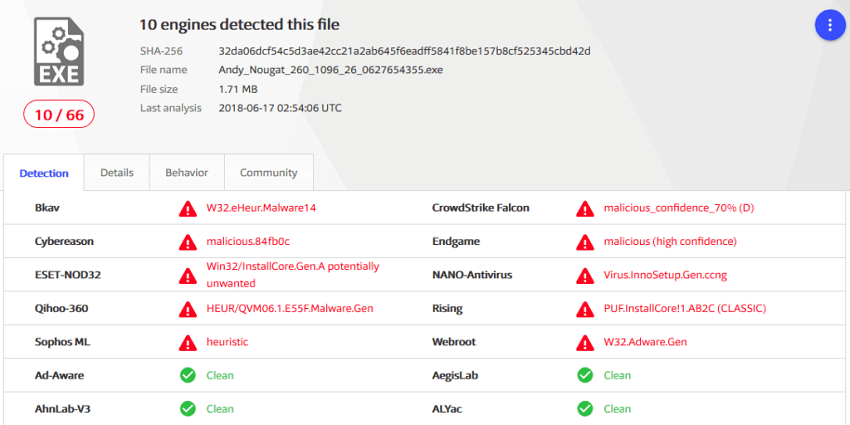
A Reddit user noticed strange activity on his computer after installing the emulator in question, and announced his discovery in a post.
After some digging, TopWire figured out that a miner that appears as Updater.exe entered his computer when he installed the emulator. It runs even when the emulator is not open, and there is no way to remove it without completely uninstalling the Andy Android emulator.
Cryptominers programs that use the resources of the computer they are running on. In this particular case, TopWire noticed FPS drops and freezes, as well as very high temperatures on his graphics card for no apparent reason.
The incident was reported to Andy’s developers, but while they claimed that they were not involved and that the miner came from a third party tool, the published data contradicts them. A friend of TopWire repeated the installation process and recorded the entire process on video, which you can find at the end of the article. “A friend repeated the installation process and it seems that this is not an error. The installer itself calls an IP that downloads the bitcoin miner to your system.” The problem has already been reported in several sub-reddits and the developers are trying to hide the issue, removing all related posts from their sub-reddit.
“It’s obvious that they don’t care about fixing the problem, and they’re doing everything in their power to contain the issue. The fact that they’ve blocked me from everywhere so I can’t contact them, or make new posts on their page speaks volumes about the company’s intentions,” said TopWire.
Needless to say, many users have already removed the app from their computers. Well-known mirror download sites like softpedia have removed the download links until the company's position is clarified. If you are looking for an alternative Android emulator for your computer, then we recommend Bluestacks, as it is currently your best option.
[su_youtube url=”https://www.youtube.com/watch?v=zwKbt4sV4do” width=”640″ height=”380″]https://www.youtube.com/watch?v=B7o0qA4L4So[/su_youtube]
