

A Chinese security researcher has discovered a new phishing attack that is nearly impossible to detect and can fool even the most cautious internet users.
The hacker says he can use a known vulnerability in Chrome, Firefox, and Opera browsers to display fake domains of legitimate services, such as Apple, Google, or Amazon. This can easily steal credentials and other sensitive information from any user.
What did we know so far about protection against phishing attacks?
In general, we had to check the address bar once the page loaded and whether the connection was secure with HTTPS.
Of course, we also paid attention to other small details, such as whether there were spelling errors or imperfections in the page design. 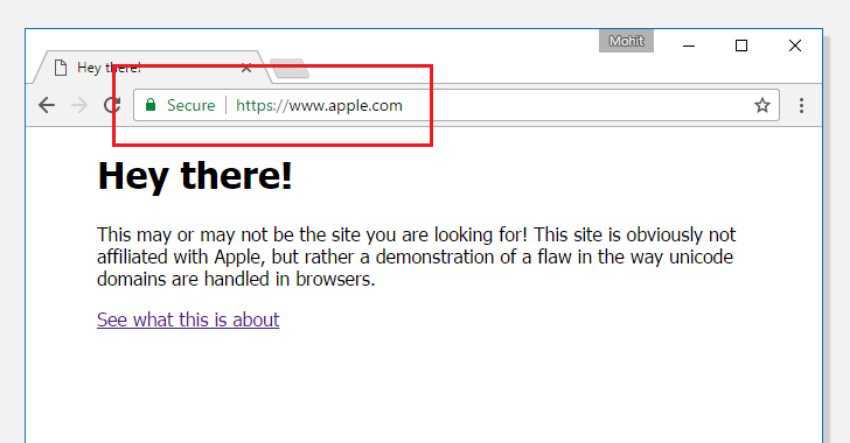
The demo website (note: currently experiencing downtime due to high traffic), set up by Chinese security researcher Xudong Zheng, who discovered the attack, appears to be very authentic.
“It is impossible to identify the page as fake without carefully looking at the URL or the website’s SSL certificate,” said Xudong Zheng.
Although your web browser displays “apple.com” in the address bar with a secure SSL connection, the page content comes from another server (as shown in the image above).
There is another website (PoC) created by Wordfence security experts to demonstrate the vulnerability of browsers.
The “homographic” attack has been known since 2001, but browser companies don’t seem to have fixed the problem. It’s a type of spoofing attack where a website address appears legitimate, but it’s not because a character or characters have been replaced with Unicode characters.
Many Unicode characters, which are alphabets (Greek, Cyrillic, and Armenian) are used in internationalized domains. The characters look the same as Latin characters but are treated differently by computers since they completely change the web address.
For example, the Cyrillic letter "a" (U+0430) and the Latin "a" (U+0041) look the same but are treated differently by browsers.
However, what appears in the URL is the Cyrillic “a” which of course leads the browser to another address.
So the only "obvious" way to tell if the page is fake is from the Certificate.

By default, many web browsers use the “Punycode” encoding to display Unicode characters in URLs and protect against such homograph phishing attacks. Punycode is a special encoding used by the web browser to convert Unicode characters to ASCII characters (AZ, 0-9), which are supported by the Domain Names (IDNs) system.
Zheng reported the vulnerability to the companies developing the affected browsers.
While the Mozilla Foundation is currently still looking for a solution, Google has reportedly already patched the vulnerability in the experimental Chrome Canary 59 release. We expect a permanent fix with the release of Chrome Stable 58, which will be released later this month.
For those of you using Firefox, follow the steps below to temporarily fix the problem:
Type about:config in the address bar and press enter. Promise you'll be good guys...
Type Punycode in the search bar.
The browser settings will display the parameter titled: network.IDN_show_punycode
Double-click or right-click and select change to change the value from false to true.
Unfortunately, there is no similar setting in Chrome or Opera.
