


Skype is one of the most popular applications for video and audio calls over the Internet. It is available for various operating systems including Windows, Linux, Android and Windows Phone. Microsoft recently bought it to replace its own Windows Live Messenger with Skype. It is now closely integrated with Windows, since Windows 8.x it comes as a built-in Metro application.
If you are a Skype user, you may have noticed that the application “hangs” when it starts, especially if it starts with your entire computer. This annoying behavior is caused by the program’s history synchronization feature. While it is useful to have all of your Skype history on each of your PCs/mobile devices, over time the file size can become quite large.
So, in this case Skype takes several minutes to load and sync its entire history. That's why it seems to be stuck. To fix this, simply change your instant messaging settings to reduce the size of the history.
- Go to Skype's main menu -> Tools -> Options..
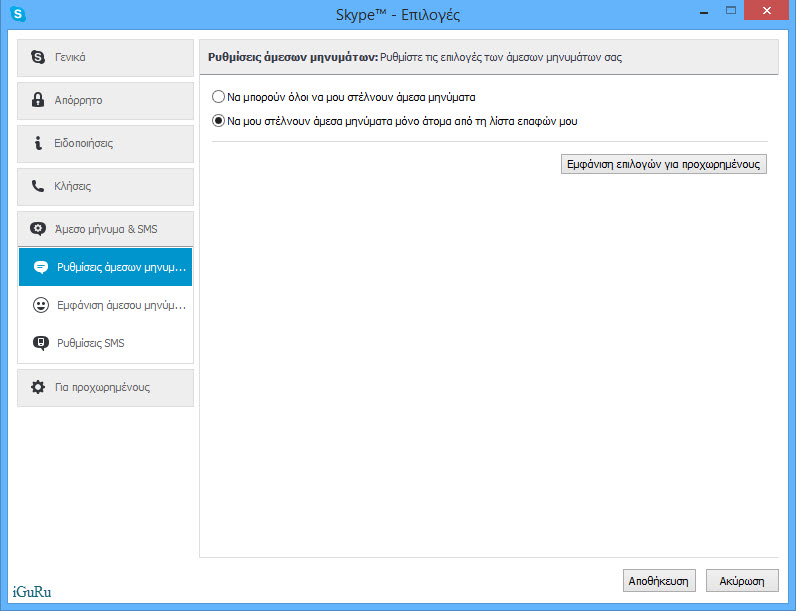
- Navigate to Instant Messaging and SMS on the left
- Navigate to Instant Messaging Settings in the submenu
- Click the Show advanced options
5. Change the Keep History option to two weeks:
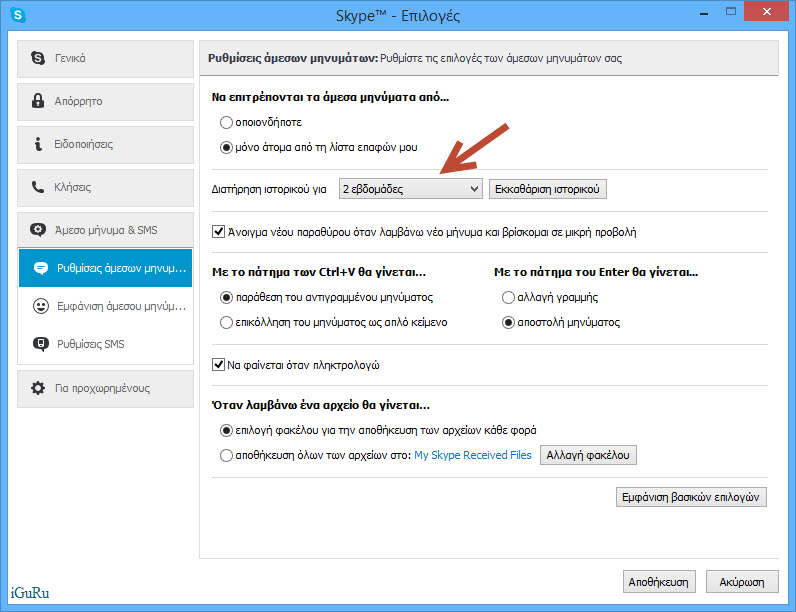
6. Optionally, you can also Clear History if you don't have anything important in your conversations.
Now Skype will start quickly.
