

Almost a month after security researchers first discovered the Bart ransomware, Jakub Kroustek, a security researcher for AVG, has created a free decrypter to recover files locked by the Bart ransomware.
In today's ransomware-filled landscape, Bart stands out from its competitors for two reasons.
First, the ransomware is distributed via one of the largest malware distribution botnets in the world—the same network that spreads the Dridex banking trojan and Locky ransomware.

Second, Bart doesn't use encryption to lock down your data, but simply takes all your files and places them inside a password-protected ZIP archive, deleting the originals.
Kroustek discovered that Bart does not use different passwords for all files, but only one for all. The researcher was able to create a free decrypter, which victims can use to recover their locked files.
How to decrypt files locked by Bart ransomware
Step 1: To use Decrypter, you will first need to download from the AVG website. Once you have downloaded Decrypter, simply double-click on it to launch it.
Step 2: Select the location on your hard drive where Bart has locked your files in password-protected ZIP archives.
Step 3: Define two versions of the same file to compare. One must be locked by Bart while the other must be the original version of the same file.
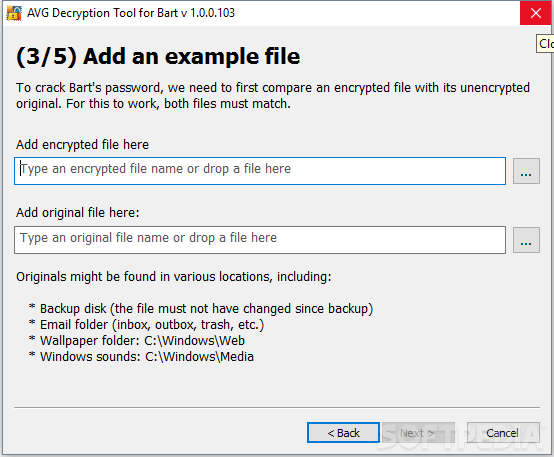
This should be pretty easy since Bart doesn't rename the files, but only adds the bart.zip file extension to the end.
To find an original file, either use one from your Dropbox, a file you received via email, or one you have saved on another computer or portable flash drive.
Step 4: Give Decrypter time to compare the two files and identify the password for the ZIP file. After that, the decryption process will be a point-and-click experience. If you need more help, AVG has also published a tutorial.
