

WhatsApp has introduced a new feature that allows users to send their own avatar reactions as reactions to Status updates, in addition to the existing emoji reactions.
WhatsApp regularly updates the app to improve the user experience. We admit that we don't always agree with some of the developers' decisions, but overall WhatsApp is constantly improving to be compatible with other messaging apps, especially considering the number of people who use it every day. Since last year, the chat app has allowed users to send emoji reactions when replying to a status on Android. The Meta is now working to improve this feature a little further by allowing users to send their own avatars as reactions.
As with emoji reactions, you can choose from eight avatars in total for each WABetaInfo. The feature appears to have been enabled in version 2.23.18.9 of the WhatsApp beta for Android. However, unlike most other WhatsApp betas, it doesn't appear to be widely available to testers yet, the site reports.
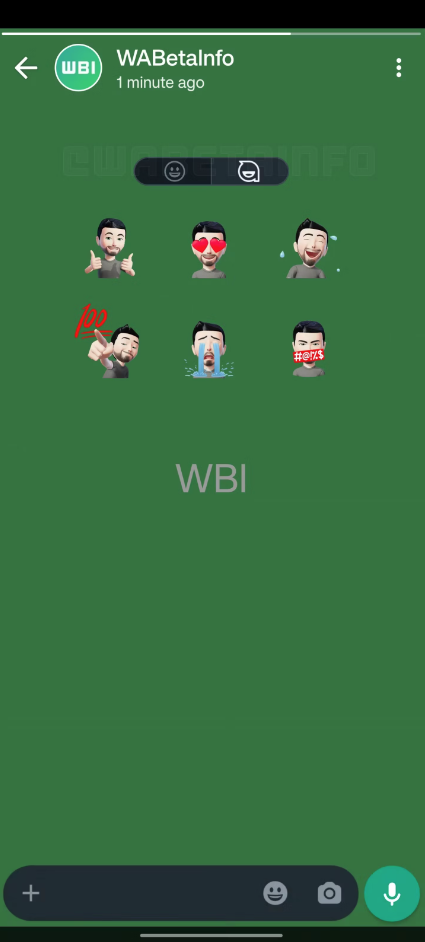
When it becomes widely available, users should be able to switch to avatar reactions with an option right next to the existing set of emoji reactions, as seen above. The most commonly used set of reactions is shown in the screenshot, although here we only see six, not eight, as the website states.
There's no doubt that avatars offer a more personal feel compared to simple emoji, so we anticipate this feature will gradually become available to beta testers before rolling out to the stable release at some point in the future.
While you can grab WhatsApp for Android beta v2.23.18.9 via the Google Play Store now, the visibility of this new avatar reaction feature isn't guaranteed, as we've seen. Still, this is a decent visual redesign of WhatsApp status reactions and something that regular users will enjoy.
One of the latest additions to WhatsApp's never-ending list of features was a new animation when switching between video and audio. At the same time, the app finally started allowing users to share high-resolution photos and HD videos with contacts , which are good options when sending compressed (low-quality) images or videos.
Information source: androidpolice.com
