

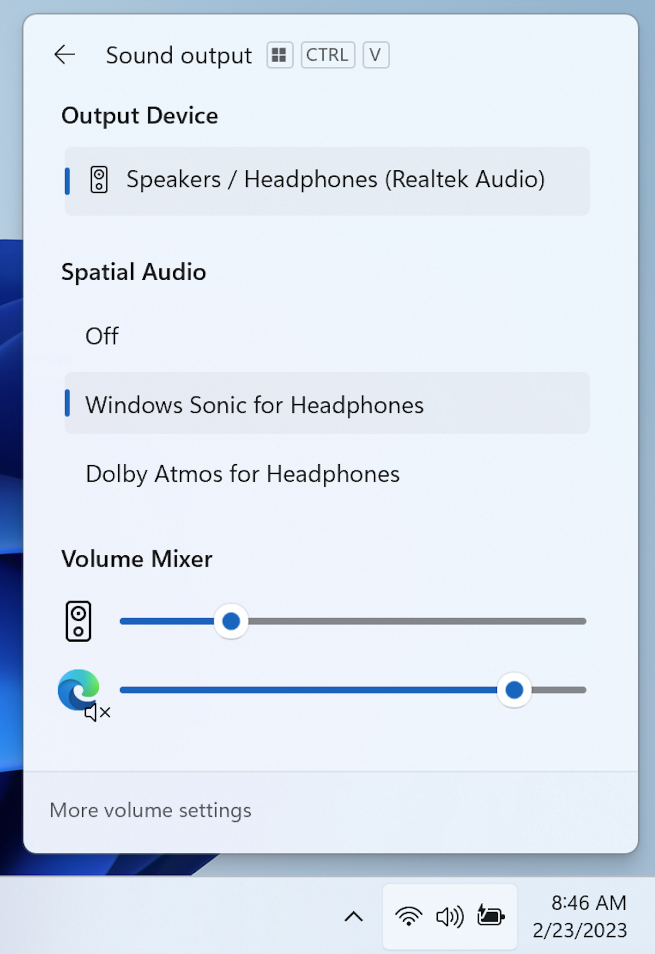
A new and improved audio mixer is coming to Windows 11 that allows users to make individual volume and audio output adjustments directly from the taskbar. The updated volume mixer was officially revealed as part of the new preview build 25309 that is being released to testers on the Windows 11 Insider Developer Channel.
When released, the updated mixer will be located within the Quick Settings panel on the Windows taskbar, which you can access by clicking the volume icon. Microsoft has also added a new Windows keyboard shortcut (Win + Ctrl + V) to open the mixer directly. The mixer allows users to quickly switch between audio outputs (i.e. headphones, speakers, etc.), as well as adjust the volume of individual applications and toggle spatial audio technologies like Windows Sonic and Dolby Atmos.
See also: Microsoft adds Bing AI Chat to the Windows 11 taskbar

This isn't the first time we've heard about the new volume mixer. Before Microsoft 's official announcement , the feature leaked last month after it was discovered in an experimental flag of a Windows 11 preview build . It may also look familiar to anyone who's used EarTrumpet — a third-party volume control app for Windows that was created nearly five years ago to "fill in some gaps in the audio management experience in Windows 10."
See also: BlackLotus bootkit bypasses UEFI Secure Boot on patched Windows 11
See also: Notepad gets tabs in Windows 11
“With this change, you can now customize your audio experience with more control and fewer clicks to better manage your favorite apps,” Microsoft says of the redesigned interface. There’s no word yet on when Microsoft plans to roll out the latest features to all users, but we’re hoping it ’ll be out to the general public soon.
Information source: engadget.com
