

How can you identify if a particular email address is real or fake? The obvious solution is to send a test email to that address and if your message doesn't bounce back with an error notification, we can assume that the address is real.

It should be noted, however, that some websites may have configured a catch-all email address system, which practically means that all messages, even those addressed to inactive mailboxes, will not be returned to the sender.
So let's see what other ways we can confirm the validity or not of an email address.
Ping it!
When you send an email, the message goes to an SMTP server, which then looks up the MX (Mail Exchange) records associated with the recipient's email domain.
For example, when you send an email to kapoios@kapou.com, the mail server will try to find the MX records for the domain kapou.com. If the records exist, the next step will be to determine whether the specific alias (kapoios in our example) exists or not.
Using a similar logic, we can verify an email address from our computer, without actually sending an email. Let's see how:
Steps
Let's say we want to verify whether or not the address tsiprasalexis@gmail.com exists:
Step 1. Enable telnet on Windows or use the PuTTy. If you are using a Mac, open the iTerm application.
Step 2. At the command prompt, type the following command:
nslookup -type=mx gmail.com
With the type set to MX, our command will extract and list the MX records of the email domain. Replace gmail.com with the domain of the email address you are trying to verify. 
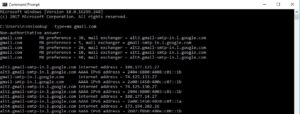
Step 3. As we can see, it is not uncommon to have multiple MX records for a domain. Choose one of the servers listed in the MX records, preferably the one with the lowest priority number (in our example, gmail-smtp-in.l.google.com) and simulate the process of sending an email from your computer.
To achieve this, go to the command prompt window and type the following commands in order:
To connect to the Server:
telnet gmail-smtp-in.l.google.com 25
Greet the Server:
HELO
Use a fictional email address as the sender email:
mail from:
Enter the email address of the recipient you want to check:
rcpt to:
The server response for the 'rcpt to' command will give you an idea whether the email address is valid or not. You will get an “OK” if the address exists otherwise you will get a 550 error like:
abc@gmail.com – The email account you tried to reach does not exist.
support@gmail.com – The email account you tried to reach is disabled.
That's it! If the address is valid, you can perform a reverse email search to find the person behind that address.
