

Linux stopped being an operating system reserved only for “hackers” a long time ago. The command line is still essential, but all popular Linux distributions offer a full graphical environment, called a desktop environment or DE for short, in which you can work just like any other operating system.
If you've decided to try Linux, you should first read here, and then choose a distribution that clicks for you. Below we'll look at some of the distributions we prefer (no, you won't find anything Ubuntu-like).
openSUSE

openSUSE is a popular Linux distribution. It is based on the RPM package management system, has KDE as its main desktop environment, but also offers: GNOME, XFCE, LXDE, Mate and others. In addition to the stable version, openSUSE also has a rolling release (Tumbleweed) for those who want the latest software. It offers a comprehensive system management solution called YaST and comes with several pre-installed applications to get you started.
Best for users who want a stable and reliable system with very good support
Debian

Debian is one of the oldest and best supported Linux distributions out there. Technically, it is the father of many other distributions. It focuses on stability. So new versions are not released often, but when they do they have been thoroughly tested. Debian offers over 37,000 packages, since almost every piece of software available for Linux has a Debian package. You can try Debian live before installing it, and choose between a minimal or full installation. There is a graphical installer to guide you through the process, and you can install any DE you want, as it supports them all.
Best for: servers and users who want a stable and secure system that doesn't need constant updates.
Mageia
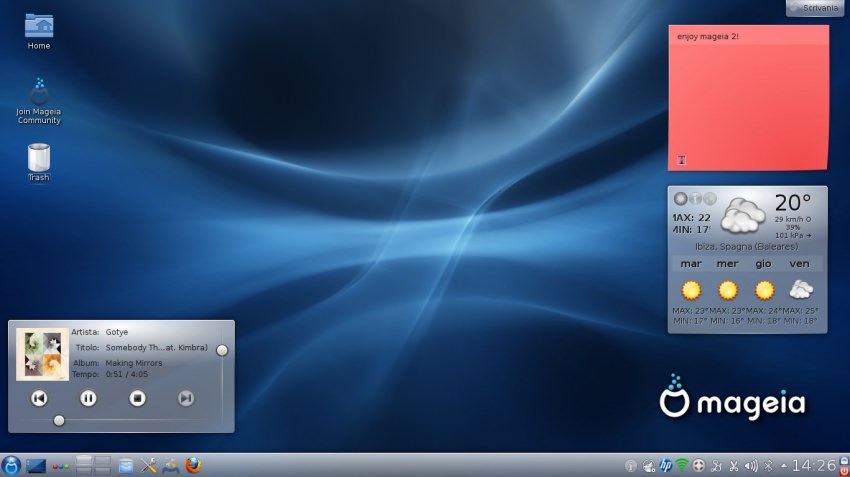
Mageia is a distribution created by former Mandriva Linux employees in 2010. It uses the RPM package management system and offers several desktop environments: KDE, GNOME, LXDE, XFCE, Mate, Cinnamon and RazorQt. You can install all of them either from the Mageia DVD or from the repositories. The distribution uses the Btfrs file system by default and provides useful tools for installing the system and customizing it. It is a good choice if you don't like Ubuntu-based distributions and want to try something different.
Best for users who want to try a new Linux distribution that is user-friendly and supports multiple DEs
PC Linux OS
PC Linux OS, or PCLOS for short, has a reputation for being a simple distribution that supports a lot of applications out-of-the-box. It comes in two lightweight flavors – LXDE and Mate, a standard KDE desktop, as well as a special edition called FullMonty, which is a customized version of KDE with a lot of pre-installed applications and separate workspaces for different activities.
PCLOS uses the RPM packaging system and has its own repositories with plenty of applications to keep you busy. It's a rolling distribution, so you should expect regular updates and new software releases.
Best for beginners who want the latest software, or users who don't want to spend too much time setting up their system
Manjaro Linux

Manjaro Linux has the incredible power of Arch Linux but a user-friendly interface when it comes to installing the distribution and maintaining your system. The default DE is the lightweight and reliable XFCE, but it also has KDE, GNOME and Cinnamon versions.
Manjaro automatically detects the hardware your computer is using and finds the drivers, supports multiple kernels, and has its own repositories of tested software. However, users can also access the Arch Linux repositories.
It's a rolling distribution, so your system will be up to date with the latest software. Manjaro is a good choice if you want the latest software and drivers, but don't want to be a stuntman to install it.
Best for users who want the latest software, or for users who want to try Arch Linux but don't feel ready yet.
Korora
Korora is based on Fedora, but provides media codecs and third-party repositories to make the setup process easier for new users. It comes with desktops for all tastes: GNOME, KDE, Cinnamon, Mate, and XFCE.
Korora aims to make Fedora more appealing to a wider audience. It comes with popular applications like Firefox, VLC, Google Chrome, and Dropbox by default. The distribution's releases follow the Fedora schedule, so you can expect a new stable Korora release every 6 months or so.
Best for new users who want to try a user-friendly version of Fedora, or for experienced users who want out-of-the-box multimedia support.
Fedora
Fedora is often referred to as a “bleeding-edge” distribution, and that’s no coincidence. It means that it focuses so much on innovation and cutting-edge technology that it sometimes comes at the expense of stability. It comes in three main editions: Workstation, Server, and Cloud, and there are many versions of Fedora that provide different desktop environments and software collections. The default DE, however, is GNOME. Fedora is an RPM distribution with its own repositories.
A particularly important feature is Linux Security Enhanced (SE) which is implemented in the kernel and serves to make Fedora one of the most secure distributions available.
Best for advanced users who want to try out the latest software, but also for users who value secure systems.
Arch Linux

Arch Linux, which we left last, is a powerful Linux distribution. But with great power comes great responsibility, and in this case, that means you are responsible for your operating system. Installing and configuring Arch Linux requires relatively advanced knowledge, but there is always the help of detailed tutorials and official guides.
You can install everything on Arch: Linux, KDE, Cinnamon, GNOME … and there are hundreds of applications available in the Arch User Repository (AUR). It is a rolling distribution and new snapshots are released quite often. Updates can sometimes break your system, as Arch Linux gives you complete control over what to choose and to configure every last detail. It has a very good forum and an equally good wiki, where you can find help for any problem you encounter.
Best for advanced users, for users who want to learn more about Linux, and for users who prefer a minimalist installation and have time to dedicate..
