

It's very easy to find out who has ignored your friend request on the largest social networking site, Facebook. You can see the entire list of those you have sent friend requests to and you can also take them back or cancel a sent friend request.

Facebook is one of the most popular websites used worldwide by approximately 1.5 billion people. It has grown to become the largest medium for people to connect and share their lives.
Sometimes, we send a friend request to a person on Facebook and forget to check if it has been accepted or not. Previously, it was not possible to know on Facebook whether it was accepted or not. But now we are able to know who ignored our friend request !
Here are some simple steps you should know to learn it.
Step 1: Go to the Friend Requests section on the home screen and click on it.
Step 2: Scroll down and go to the bottom of the page. Click on View All.
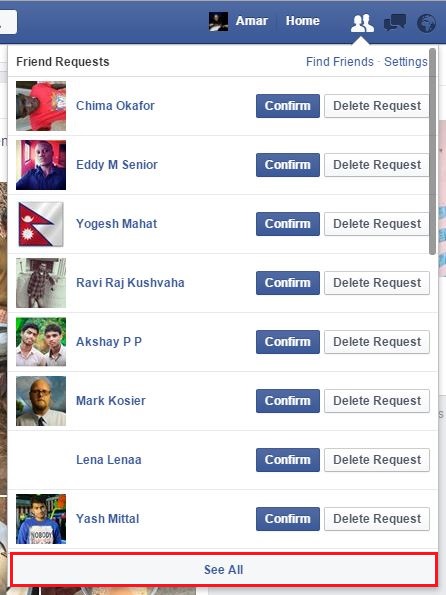
Step 3: A new page will open. On the left side of the page, you will see the link “View sent friend requests”. Simply click on the link and you will see all your friend requests.
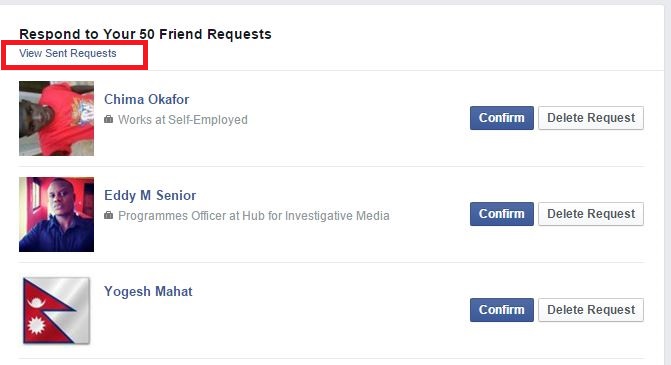
On this page, you can also cancel sent friend requests.
