
“Awesome!! Buy this super-effective freckle remedy!”, “The only way to deal with nightmares for good!!”, “Unique diet!! Just stop eating these 5 products…” – I won’t even dare to ask if you’re tired of banner ads on the Internet. Even the most innocent of them become tiresome as part of all this propaganda, which is more than enough for today’s online users to even consider clicking on these banners.

I’ll tell you how we can get rid of them. The first step is to install Kaspersky Internet Security on your computer. It’s very simple and can be done in just a few clicks.
All you need to do is open Kaspersky Internet Security settings, go to Protection and select Enable Anti Banner.
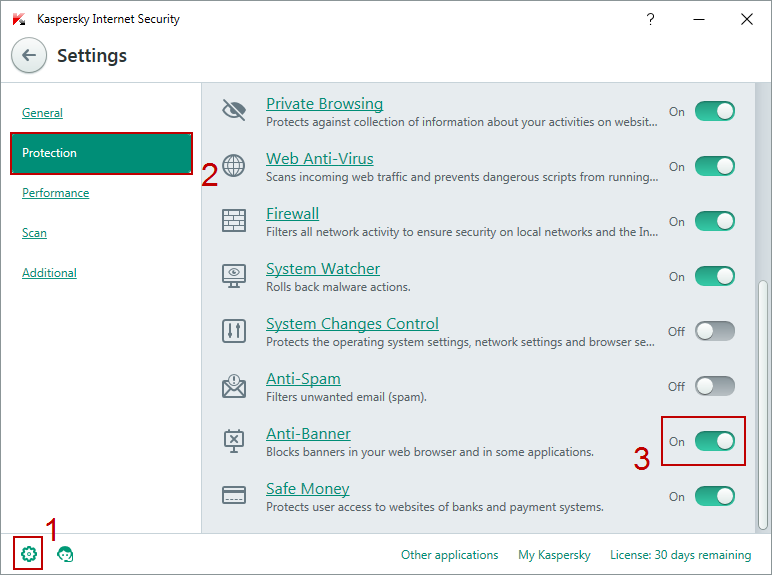
Kaspersky Internet Security already includes the list of banners, which will be blocked automatically once this option is enabled. If you come across a banner that bothers you but is not yet on the list, you can block it yourself.
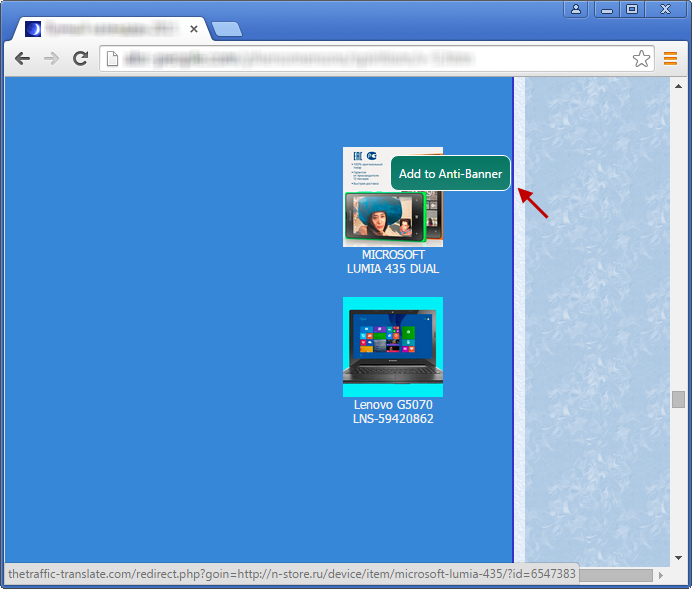
Hover your mouse over the banner and press the Ctrl key. Then, click the Add to Anti Banner button.
In the new window, you will see the URL of the banner (such as https://example.com/*.jpg). In case you want to block all banners on this website, edit the URL so that it points to: https://example.com and click Add.
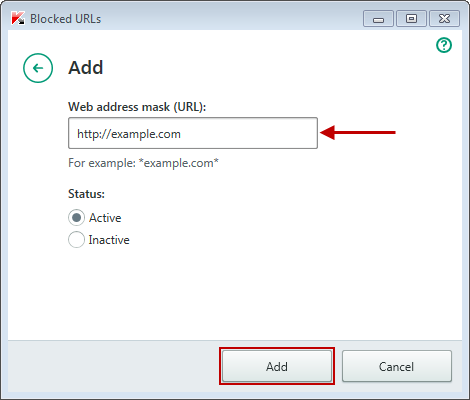
Now all banners from this website are now blocked. By adding banned URLs to the Anti Banner list, you can avoid annoying website ads.
Tip of the week: How to get rid of banner ads

📧
Subscribe to the SecNews Newsletter
