

Apple appears to have recently updated the Wallet app to allow users to add an Apple Account Card, which displays the Apple credit balance associated with an Apple ID.
See also: Apple: Is it in talks with Electronic Arts (EA) about a possible acquisition?

If you receive an App Store or Apple Store gift card, for example, it is added to an Apple account that was previously visible in the App Store and Apple Store apps. Starting today, the Apple account balance can also be added to a new card in the Wallet app.
See also: Apple Music for students: Subscription price increases in several countries
To add the card, open the Wallet app and under “Available Cards,” tap “Add Apple Account.” As long as you have an Apple account balance, you’ll be able to add the card.
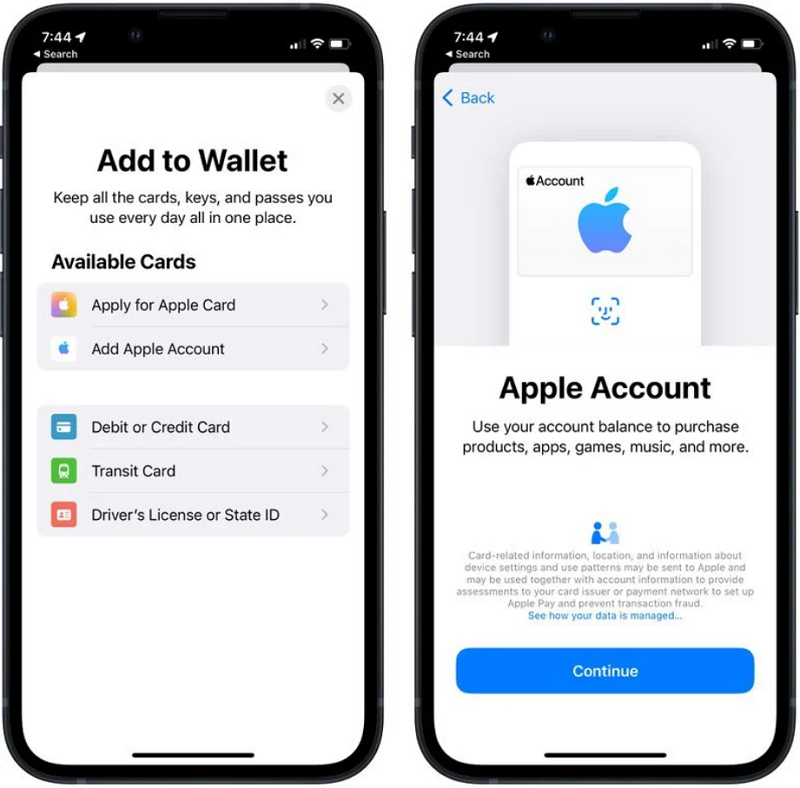
Once added, you can view your Apple account balance directly from the Wallet app and use it to purchase Apple products , apps , games , and music. It works the same way as any other card in the Wallet app when you're in an Apple Store.
The Apple ID card replaces the iTunes Pass , which was a pass that users could add to the Wallet app to check their Apple ID balance. The pass had a QR code that allowed customers to purchase products at Apple retail stores
See also: Apple executive who resigned over return-to-office policy joins Google
Apple Account Card can be added to devices with iOS 15.5 or later.
Source of information: macrumors.com
