

Mozilla will introduce a new policy in Firefox 67 that will block installed extensions when you run a private window.

The reason is very simple: since extensions sometimes need to access your data to function properly, and private browsing mode is supposed to be private, Mozilla believes that blocking add-ons in Firefox, by default, can ensure that there are no traces left behind.
And to do this, the company decided to block all extensions in private windows by default unless you allow them to run. That means you can configure this specific ban at will.
With this change, Mozilla continues its efforts in Firefox for increased privacy protection and is likely to win the hearts of many users who believe this is the right approach and do not agree with the data collection that occurs in other browsers.
The feature is already being tested as part of the Firefox nightly build, so you can try it out now if you install Mozilla's Nightly browser.
Starting with Firefox 67, whenever you open a new private window, you will be given a notification that extensions have been blocked.
A similar warning is placed in the Firefox browser's extensions configuration screens.
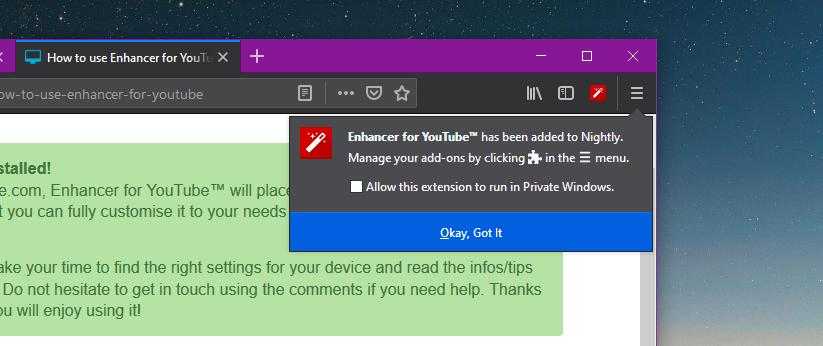
Firefox 67, as we said earlier, will come with a setting that will allow you to enable extensions in the browser's private mode, but you will have to set the new permissions individually for each add-on.
There are two ways to do this. First of all, you can enable a specific extension to run in private windows when installing them. A notification will appear when installing extensions that will allow you to set: “Allow this extension to run in private windows.”.
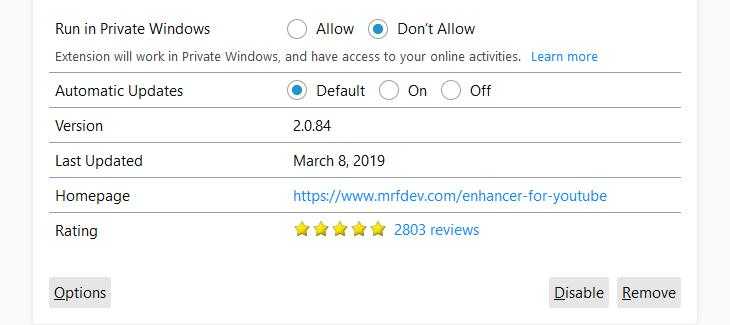
If you want to configure extensions that are already installed, you need to go to the add-ons manager in Firefox 67. You can simply type about:addons in Firefox to see your installed extensions.
Enabling them to run in private windows can be done from the options of each extension as follows: “Run in Private Windows > Allow”. By default, this option is set to “Do not Allow”.
Please note that Firefox 67 is currently in the experimental stage and the final version could have additional settings. According to the company's schedule, Mozilla Firefox 67 should be released to users on May 14, 2019, so the team developing it still has two months to make sure everything works as it should. If you install Nightly, please note that this is an experimental browser and some things may not work correctly.
