

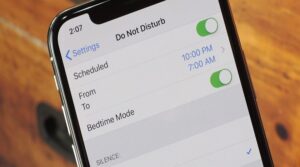
 Bedtime DND is one of the most important updates in the latest version of iOS. The new feature will help you get a peaceful night's sleep without worrying about notifications flashing on your phone's screen in the middle of the night.
What is Do Not Disturb At Bedtime?
This iOS 12 feature, when enabled, not only silences incoming notifications but also ensures that they don't flash on the lock screen. Notifications are sent directly to the notification history. This feature is intended to discourage the user from opening notifications in the middle of the night.
How does it differ from Do Not Disturb?
This feature silences your notifications for a set period of time, but notifications remain visible on the lock screen and the iOS device's screen lights up when it receives a notification. In contrast, the new feature does not let notifications and alerts appear on the lock screen.
How to enable Do Not Disturb At Bedtime on iOS 12?
Follow the steps below to enable the latest addition of iOS 12 to the DND feature:
- Go to the “Settings” app and click on “ Do Not Disturb ”.
- Turn on “ Do Not Disturb ” and change the option to “Scheduled.”
- Here you need to set the time limit for which you want to enable this feature. Ideally, you should choose the time you want to escape notifications and sleep or rest away from your phone.
- The last step is to toggle the button next to “Bedtime” to enable “Do Not Disturb for Bedtime.”
In conclusion
The new iOS 12 feature is an important characteristic that could be useful for those who do not want to be disturbed by notifications during the night. In combination with other new features such as monitoring app usage, they can help us break our addiction to our phone screen.
