

Malwarebytes Telecrypt Decryptor is a free program developed by the well-known security company and aims to help you decrypt files encrypted by the Telecrypt ransomware.
Telecrypt is a rather peculiar ransomware that is distributed in various ways, including: emails, exploits, and drive by downloads.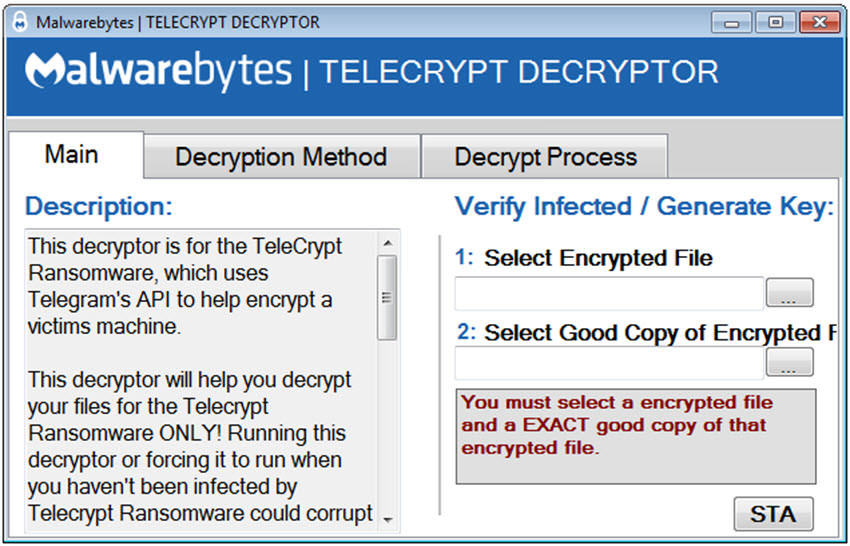
What makes Telecrypt special is that it uses the API of the popular messaging service Telegram to communicate with its creators, rather than a control server on the Internet.
The Telegram messaging service has an open API, so anyone can use the protocol.
TeleCrypt encrypts files on the system, and then launches a program that informs victims of the malware that their files have been encrypted. Of course, the ransomware immediately demands money for decryption. The malware can encrypt more than a hundred different file types such as: jpg, XLSX, docx, mp3, 7z, torrent or ppt.
The Decrypter now developed by Malwarebytes requires that you have access to a good copy of one of the encrypted files. The file type does not matter.
You will need to upload the encrypted file, and an unencrypted copy of it (perhaps if you had it saved in the cloud) to the app screen. Immediately after that, click the start button and follow the process.
Telecrypt Decryptor verifies the two files. If the files match and one of them has been encrypted by the encryption system used by Telecrypt, the application will take you to its second screen.
Here you can either add the list of files encrypted by the ransomware, or select an entire folder containing the encrypted files.
It is recommended that you have a backup of your encrypted files in case something goes wrong with the decryption.
You can find additional instructions and images on the Malwarebytes blog.
