

A dangerous and fake Microsoft Security Essentials Antivirus is circulating online, designed to extort money from you.
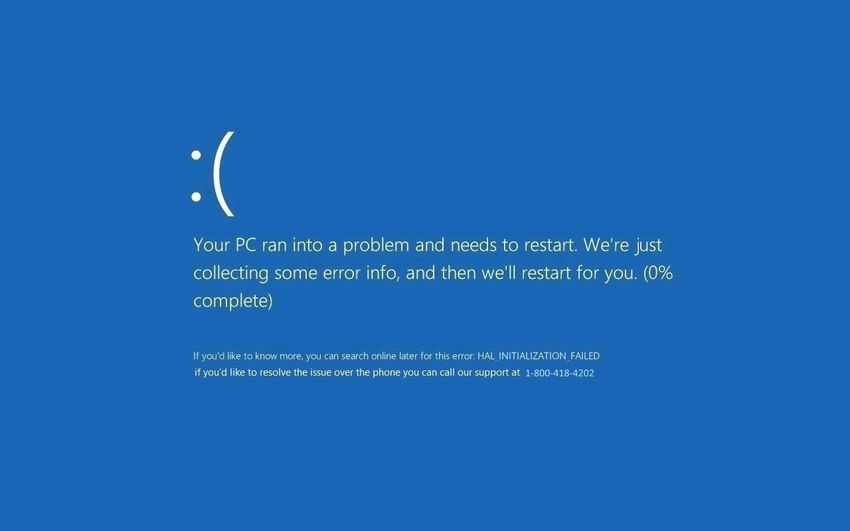
The company published a warning today to explain that this fake Microsoft Security Essentials antivirus is actually a scam detected as SupportScam: MSIL/Hicurdismos.A and its sole purpose is to convince you that there is something wrong with your computer so that you will pay a sum of money for the criminals to perform fake repairs.
We remind you that Microsoft's Security Essentials Antivirus is a free antivirus from the company and is aimed at users of Windows 7 and earlier versions of Windows.
The first suspicious fact about this fake antivirus is that it targets Windows 8 and Windows 10, while the real package can only be installed on Windows 7 and earlier. Microsoft Security Essentials has been replaced for Windows 8 and 10 by Windows Defender and comes pre-installed on all systems.
After installation, the fake package creates a blue screen that contains some evidence that proves that it is all just a malicious attempt to steal your money. The blue screen displays contact information (e.g. a phone number), while Microsoft does not include such details in error information. In this way, users who see this blue screen are encouraged to call the phone number and request technical support for their computer, of course paying a fee.
According to Microsoft, any user who makes the communication suggested by the fake blue screen encourages the criminals to place more malware on their system under the guise of support tools or software that supposedly will fix a problem that does not exist.
Additionally, note that the initial package that prompts you to download and run on your computer is called setup.exe, but Microsoft never uses that name to install or upgrade Security Essentials. Then, if you look at the file properties, the publisher is not Microsoft, and Windows SmartScreen also shows a notification saying that “the publisher of setup.exe could not be verified.”.
