

A new exploit called “Sh1mmer” allows users to unenroll a company-managed Chromebook, giving them the ability to install any apps they want and bypass the device’s restrictions.

Chromebooks enrolled in a school or business can be managed by administrators through specific policies. This allows administrators to enforce the download of specific browser extensions and apps, as well as restrict how Chromebooks can be used
Furthermore, it is almost unthinkable to deregister the device without an administrator from the organization that manages it.
See also: Porsche ends its new NFT program – phishing sites appear
In order to bypass these restrictions, security researchers at the Mercury Workshop Team have created a new exploit called “Shady Hacking 1nstrument Makes Machine Enrollment Retreat” – or Sh1mmer – to allow users to disconnect their Chromebooks from corporate management.
To execute the exploit, users must have access to a published RMA shim which will be modified by the Sh1mmer Exploit for device registration. The following Chromebook boards reportedly have publicly accessible RMA shims.

For those unfamiliar with RMA shims, they are disk images stored on USB devices that contain a combination of the components of the factory ChromOS package used to reinstall the operating system and the manufacturer tools used for repair and diagnostics.
To use this exploit, you need to download an RMA shim for your Chromebook board, use the online builder to insert the Sh1mmer exploit into it, and then run the Chrome Recovery utility.
See also: Google Fi: Hackers had access to customer information
Using the steps detailed on the Sh1mmer site, you can load the modified RMA shim to launch the Sh1mmer menu, shown below.
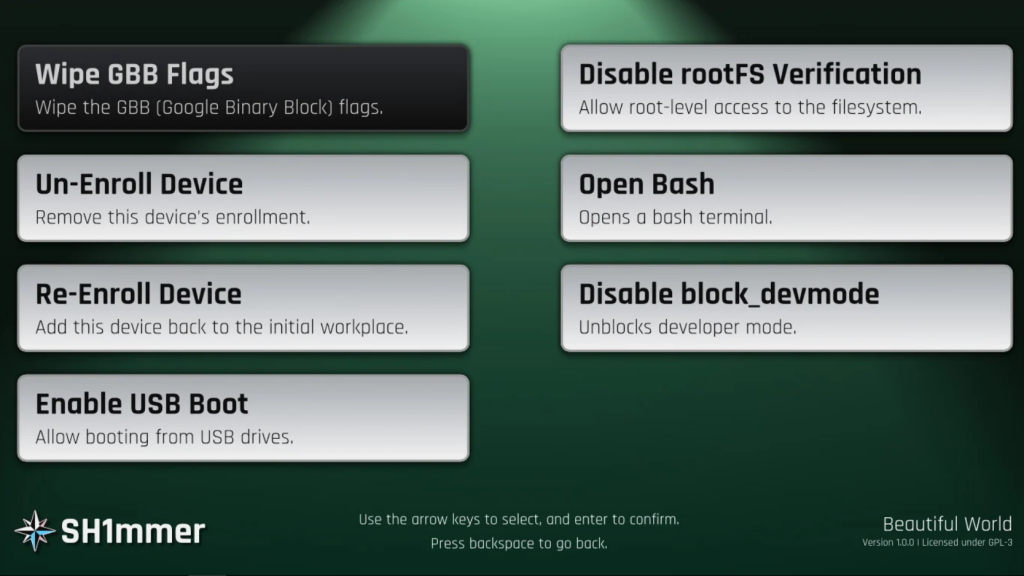
From this menu, you can unregister and re-register a device as needed, enable USB booting , allow root-level access to the operating system , open a bash shell , and more.
A Reddit user from the k12sysadmin group used the exploit and reported that he was able to easily unregister his Chromebook, allowing him to use it as if it were a brand new device.
See also: Phishing attacks are getting frighteningly sophisticated
A Reddit user in the k12sysadmin group enlightened us that administrators can enable inactive device notifications to receive notifications when a system becomes inactive, so they can investigate further and identify if an exploit was used.
Information source: bleepingcomputer.com
