

The term “image search” is familiar to those who use search engines . It means that you are searching for an image that is related to a text entered in the search bar. Google Image search is one of the most widely used image search engines used all over the world.
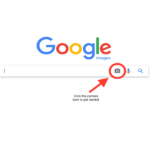
But what if you want to know all the details of an image by searching for the image instead of text? It is called reverse search and it is used to find out the real origin of an image or more details about it. Reverse search is mostly used to detect fake images which are mainly used to spread fake news.
See also: 3 ways to find out who is stealing your photos on the Web
There are many platforms such as Google, TinEye, Yandex, and Bing Visual Search, which provide free reverse image search service.
How to do reverse image search via Google on Desktop?
- Open any browser on your desktop.
- Enter the URL images.google.com in the URL search bar
- Enter the URL of the image you want to reverse search or simply upload it by clicking the “Search by Image” icon.
- You will then be taken to the image source page, where you can find out where your image was created.
See also: Face search engines: search for your friends
How to do a reverse image search on a smartphone;
- Open any browser on your smartphone and tap on the desktop website option
- Then enter the URL images.google.com in the URL search bar
- Enter the URL of the image you want to find or simply upload it by clicking the “Search by Image” icon.
- You will then discover the origin of the image you searched for. Remember that using the Deskstop feature on smartphone is essential, as reverse image search works best.
