

In this article you will see how you can listen to WhatsApp OPUS files on Windows or Mac. The easiest way is to install VLC media player, which supports the OPUS format.

1: Install VLC player.
- Go to https://www.videolan.org/vlc/index.html .
- Tap Download, and wait until it completes.
- Run the file you just downloaded.
- Follow the installation instructions.
2: Press Win+E to open the data collection.
3: Open the folder containing the OPUS file.
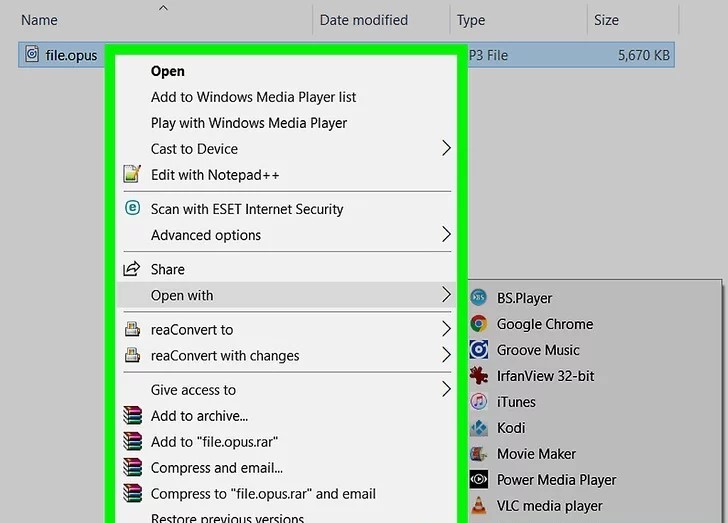 4: Right-click on the file. A menu will appear.
5: Select open with -> VLC media player.
Mac :
1: Install VLC player.
- Go to https://www.videolan.org/vlc/index.html .
- Tap Download, and wait until it completes.
- Run the file you just downloaded. The name starts with vlc and ends with .dmg
- Drag the VLC icon to your Applications folder. This will install the program.
2: Open the folder containing the OPUS file.
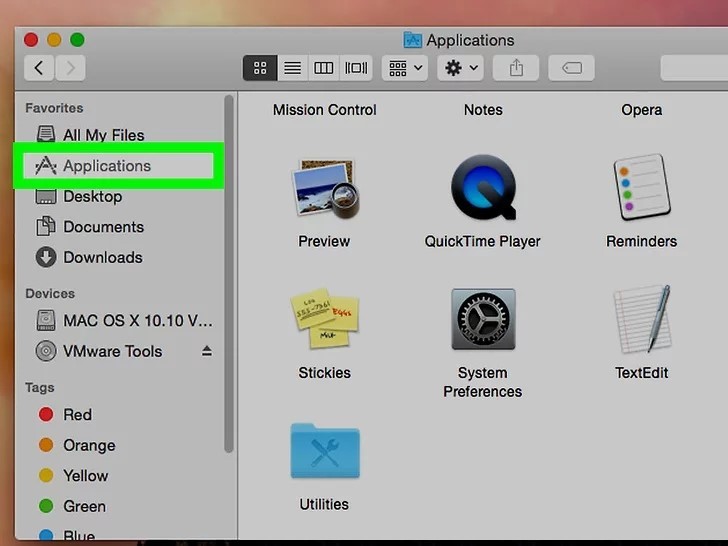 3: Open VLC player. You will find it in the Applications.
 4: Drag the file onto VLC media player. This will automatically import the file.
📧
Subscribe to the SecNews Newsletter
