

The updated 19H1 version of Windows 10 will add a new warning message to the Disk Cleanup application for the “Downloads” folder.
From the upcoming Windows 10 Build 18305 operating system, Disk Cleanup will display a warning when a user selects the Downloads folder for deletion.
In the latest Windows 10 October 2018 Update, the “Downloads” option was added to the Disk Cleanup and Storage Sense apps, and both can now be found in the “Settings”, which means that OS users can now easily clean their disk with a single click.
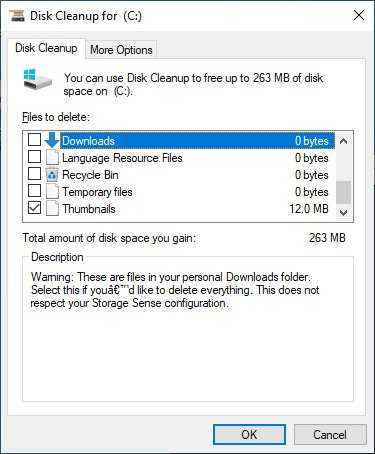
However, if someone does not know and selects all the checkboxes that exist in Disk Cleanup, they will lose all the data that was downloaded from web browsing applications, such as Firefox, Edge, or Chrome.
So according to Albacore who discovered it, from Windows 10 19H1, users will be able to read a notification that the Downloads folder will be deleted if it is selected in the Disk Cleanup application.
“Warning: These are files in your personal folder “Downloads”. Your selection will delete everything. This does not comply with your settings in Storage Sense”
It is a small change, but it will greatly help Windows enthusiasts, especially novice users of the operating system.
____________
- Allo by Google: discontinued in March 2019
- iGuRu.gr the top 20 publications of 2018
- Windows 10 Warning the Disk Cleanup also deletes downloads
