

Microsoft is planning to release the next major Windows 10 update in early October 2018 (Windows 10 October 2018 Update).
Although it is best to wait at least a month before installing the update, below we will see how you can download Windows 10 version 1809 right now. 
The method uses Microsoft's installation media creation tool to download the update via a USB Flash drive or directly without creating any installation media, from files stored on your computer.
The process is quite simple. You just need to run a command in a command prompt window, with administrator privileges.
Preparation
You need to download two files to the computer you will be downloading from and place them in the same folder.
Download the Windows 10 Media Creation Tool for the previous version 1803 from Microsoft. (If the tool immediately downloads, it will only download version 1803 and not 1809).
Download the new product.cab zip from the GitHub page.
Create a new folder on your system, e.g. c:\1809.
Place the downloaded MediaCreationTool1803.exe file in the folder and extract the products.cab zip to the same folder.
Both the files, MediaCreationTool1803.exe and products.cab should be in the same folder.
Download the new Windows 10 version 1809
In Windows search, type cmd.exe. Hold down the Shift and Ctrl keys on your keyboard. Select cmd.exe from the list of results with your mouse and open the application.
A command prompt window with administrator privileges will open after accepting the UAC. Make sure you have administrator privileges by checking the title of the command prompt window.
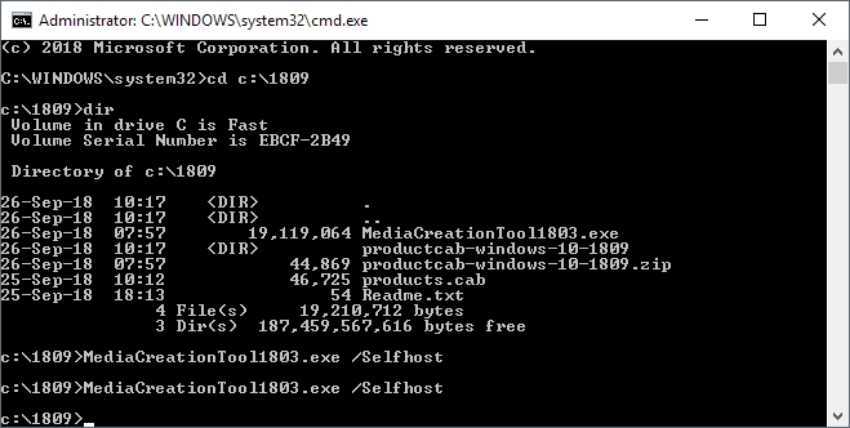
Let's go to the folder you created:
cd c:\1809
and run MediaCreationTool1803 with the following command:
MediaCreationTool1803.exe /Selfhost
The command will start the Media Creation Tool and force the application to use the local product.cab file.
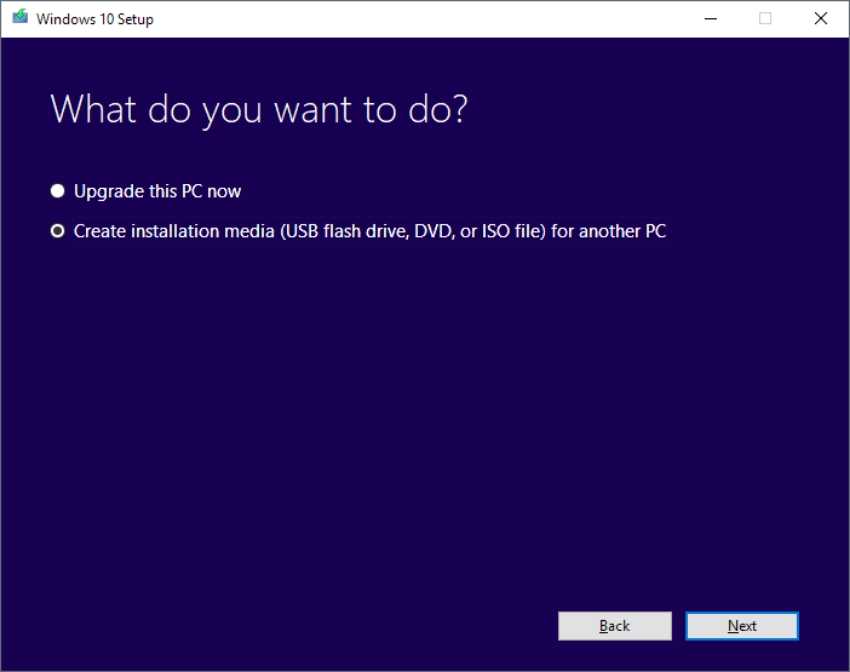
When the Media Creation Tool opens, simply follow the on-screen instructions. You have the option to upgrade your computer or create some installation media.
That's it!
Updated to add the original Media Creation Tool:
Download it directly from Microsoft:
https://software-download.microsoft.com/download/pr/MediaCreationTool1809.exe
________________
- Windows Subsystem for Linux with Flatpak support
- Windows 10 October 2018 Official name announced
- WLinux, the new distribution specifically for Windows 10, costs
