

Chrome password generator: It is well known that unique passwords are essential for your online security. A strong password is much harder to crack with a brute force attack than a password that looks like: Password123.
By using unique passwords on each website, all your accounts will still be secure in the event of a breach of one of your accounts.
Below we will see how you can activate a tool that generates unique passwords and is built into Google Chrome.
Enable Chrome's password generator flag
The tool requires you to enable one of the Chrome flags. Flags are experimental features and the changes you make may have a negative impact on your system, so proceed with caution.
Open Chrome, type the address and press Enter: chrome://flags
Towards the bottom there is the Password generation option
. Select Enabled from the drop-down box.
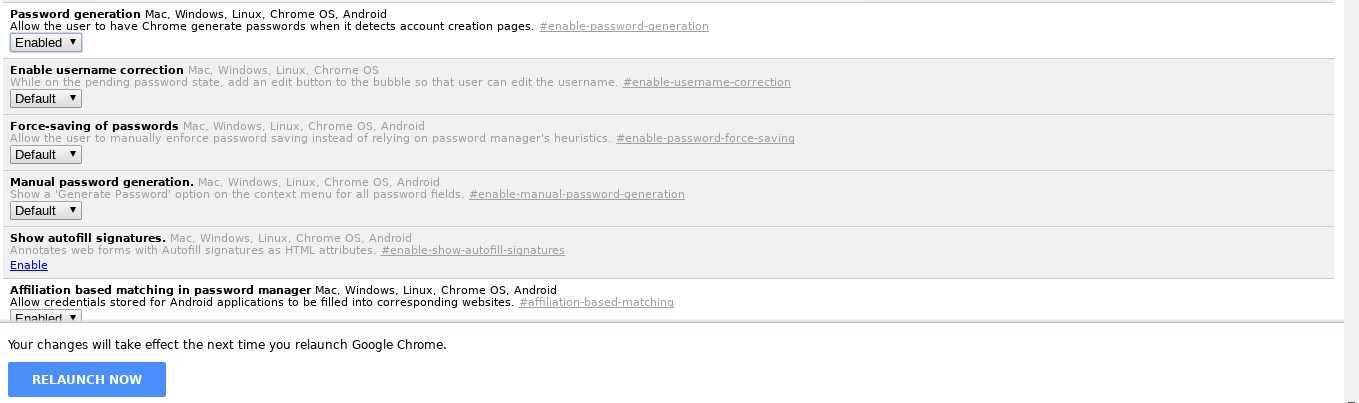 After enabling the flag, close and reopen Chrome. You're done.
Whenever Chrome encounters a password field, it will automatically suggest a random password with a drop-down menu. You can use this whenever you change a password or create a new account.
Make sure you have saved the password you created in your password manager. It is best not to save passwords in your browser.
Chrome's native password manager isn't as secure as the free password manager KeePass, which we occasionally and wholeheartedly recommend.
