

In the modern era, almost everyone carries a mobile phone. In the event of an accident, everyone would like to be able to notify their loved ones, as well as inform rescuers about their situation. In the past, phones had a list of emergency contacts, but today we have gone a step further. Spend some time and set up mobile phone , with your own emergency contacts, as well as any medical details that it would be wise for the authorities to know.

iPhone
users iPhone should set up a Medical ID, which will provide essential information for medical professionals and emergency contacts so they can reach loved ones. If you've never opened the Health app on your iPhone, you'll be prompted to enter this information the first time. However, if you've skipped setting it up or forgotten what you entered, here are the steps to follow.
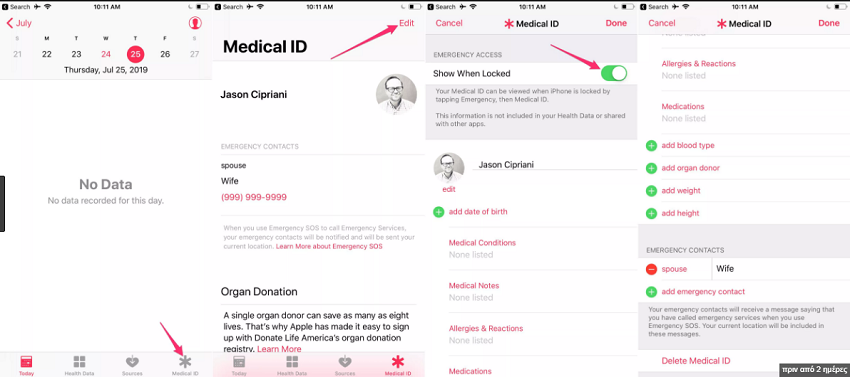
- Open the Health app and select the Medical ID tab.
- If it appears, click create Medical ID.
- Otherwise, click Edit.
- Enter any information you think will be necessary for rescuers.
- Make sure show when locked is enabled. This will allow this information to be available even on the lock screen.
- At the bottom of the Medical ID screen, there's the Emergency Contacts setting. These contacts must be part of your phone's contacts app . As you select a contact, the Health app will ask you about your relationship to that person
Now, in the unfortunate event that something happens to you, a passerby, a police officer, or even a rescuer, would be able to see all the information reported.
If you are that helpful bystander, you can find the iPhone owner's Medical ID by swiping your finger across the lock screen. If it's an older model, double-pressing the home button will bring up the screen asking for the PIN. Below the keypad on the left side of the screen , you will see the emergency option, tap it and then Medical ID.
Android
The process for adding emergency contacts to an Androidvaries depending on the manufacturer. For example, Samsung will use their phone's contacts app, while Google Pixel users should use Google's app.
Android phones other than Samsung
Open the Settings app, scroll to the bottom, and select About phone > Emergency Information. If you don't see emergency information, try this: Open Settings > Users & accounts > Emergency information.
So, regardless of how you got to the emergency information screen, tap the pencil icon to edit it and enter your medical information as well as your emergency contacts.
If the above instructions do not apply to your phone, lock it, swipe your finger across the lock screen to display the screen , and press the emergency call button. This is also how emergency responders can see your information.
Samsung
Samsung phones rely on the app for everything described above. Setting it up is pretty simple. Open the app and tap your name at the top of the screen.
Scroll down to the bottom of profile , where you will find the section that refers to emergencies. The first option will be to enter medical details, possible allergies, medication and blood type.
Tap save when you're done. Select emergency contacts to add up to three people to this list. You can also see the corresponding information on the lock screen in the same way as mentioned earlier.
Setting up your emergency contacts is a very simple way to provide those who want to help you with all the necessary information. However, we hope you never need it.
