

Encryption on Android devices: Some requirements must be met before you can go ahead and encrypt the data on your phone:
- Your Android phone must support encryption. I'm not 100% sure about this, but I believe encryption was added in Android 3.0. Alternatively, you may want to check out third-party encryption apps.
- You must set a password or some kind of lock.
- Your phone must be connected to a power source.
Setting up a lock screen may be enough if you don't have too much sensitive data on your phone. Regular attackers won't get past the lock screen, which gives them the option to reset your phone and all the custom data stored on it.
1) Setting the lock screen password
On your Samsung phone , tap on the Settings button and select Lock screen > Screen lock from the options page.
Here you need to choose how you want to protect your phone when it is locked. Available options include pin, password, pattern, or other methods. Select password protection here and make sure the password has at least six characters, one of which is a number.
I highly recommend increasing the number of characters to the maximum of 16 characters to improve security.
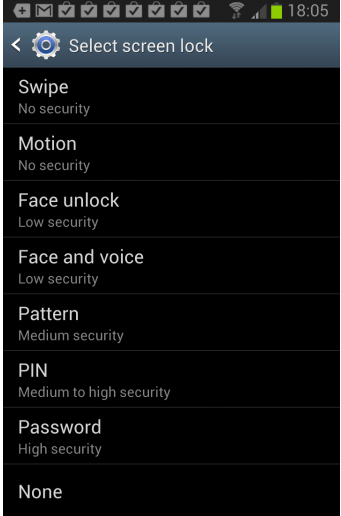
Once you set the password, you will be asked to enter it whenever you turn on the phone or want to resume work after a period of inactivity. This can be annoying, but it is a small trade-off for better security.
2) Encrypt your Android phone
You must connect your phone and make sure the battery is charged before continuing. The phone encryption option is different.
A click on Security > encryption device in Settings opens the configuration menu where you can start the encryption process.
Please note that it may take an hour or more to complete.
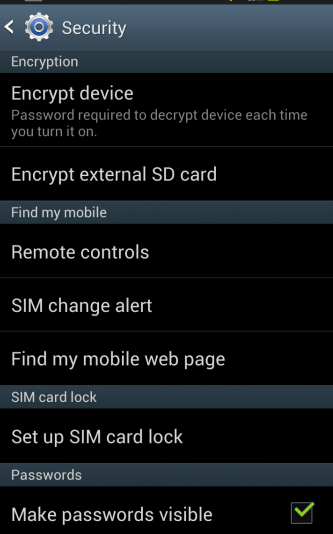
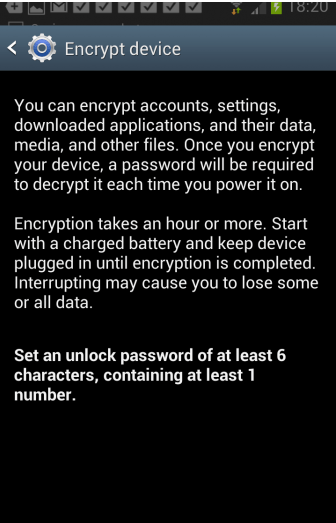
You can encrypt accounts, settings, downloaded apps, and their data, media, and other files. After you encrypt your device, a password is required to decrypt it every time you turn it on.
Encryption Start with a charged battery and keep the device plugged in until encryption is complete. Interrupting may cause you to lose some or all of your data.
Set an unlock code of at least 6 characters, containing at least one number.
