

Windows 10 includes the reliability monitor tool with which you can inspect the errors and crashes of your applications.
This is a special tool that monitors system stability and related events. Let's see how you can access this useful Windows.
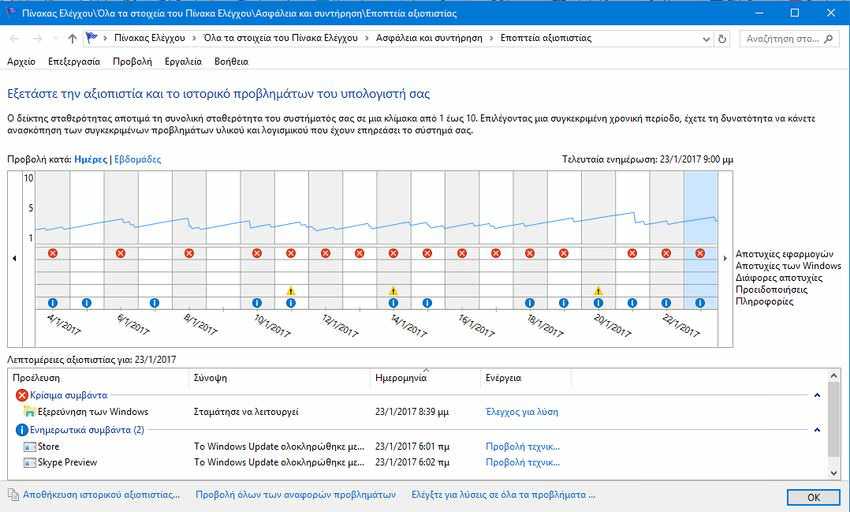
To view the reliability monitor go to the Windows settings and in the settings search window type the word “reliablity”, or if you want in Greek the word “αξιοπιστία”.
In the search results, click the item “Προβολή Ιστορικού Αξιοπιστίας”, which opens the Reliability Monitor. That’s it.
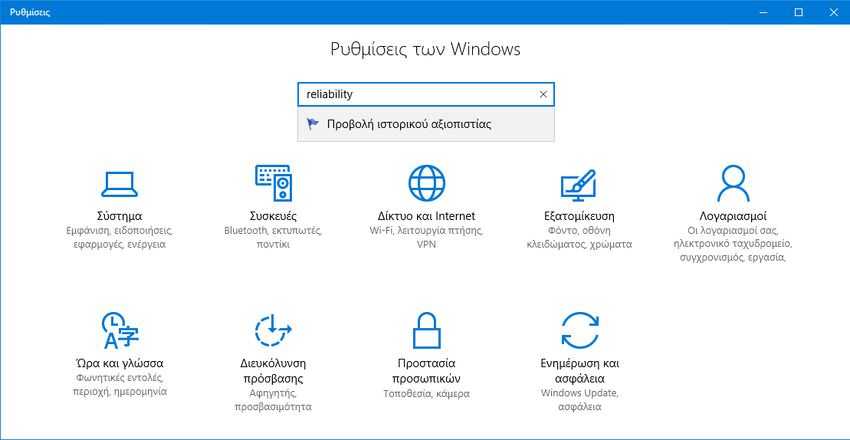
The table you will see in the window that opens looks like a graph with icons that correspond to different events.
Informational events show the correct events, such as the installation or uninstallation of an application that was successfully completed.
For critical events, such as the failure of a software installation, the graph shows a warning sign.
You can click the appropriate icon to learn more about past events. In our case, reliability monitoring has shown many crashes of Windows exploration.
At the bottom of the window, you can learn more relevant information about the event by clicking the link “View technical details”. For errors and failures, you can easily see the available solutions.
The chart is displayed using a special Stability Index whose value ranges from 1 to 10 and depends on the number of failures that have occurred during a time period. The larger the value, the more stable the operating system is.
Reliability monitoring analyzes the system's stability history for the past year. The chart you are viewing can be moved backward and forward. It is built based on the date and performs analysis based on days, but you can make it show weekly data.
It is possible to save the entire reliability history using a special link at the bottom of the window. Right next to it there are two more links. The link “View all problem reports” will allow you to see the list of all reports that are sent to Microsoft.
The link “Check for solutions to all problems” is useful to quickly check for available solutions. Windows checks for bug fixes online.
Reliability monitoring is a truly useful tool for when you need to check the stability of your operating system and see details about its failures. It displays all software errors you may have forgotten and allows you to immediately check for available fixes from its user interface with a click.
