

Google announced in February 2016 that it plans to further improve Gmail's security by adding new security indicators to the service.
One of the improvements the company mentioned was the addition of a new red question mark icon in place of the sender's profile photo, to highlight messages that were impossible to authenticate.
Google announced yesterday that it has started rolling out the new feature, and that Gmail users on the web and Android will soon notice the new red question mark icon appearing in message authentication.
The screenshot below shows the difference between authorized and unauthorized messages in Gmail.
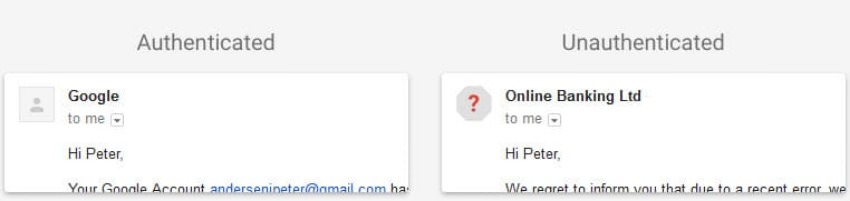
The method Google uses to determine the authenticity of a message is as follows: if a message cannot be authenticated using DKIM or Sender Policy Framework (SPF), it is marked “unauthenticated.”
Google announced another change yesterday for the web version of Gmail. The company plans to warn users when they click on links it believes are dangerous.
So if you receive a message (in the web version of Gmail) with a link that leads to a dangerous site known for phishing, malware, and unwanted software, you will see warnings when you click on the link.
The company added its own Safe Browsing technology to Gmail for the feature. Gmail users who click on unsafe links will see a full page with a warning message on the next page after the click.
The company gives you the option to continue to the “banned” website, but there is no option to disable these warnings for individual websites or even completely.
Google says there may be false positives and that the new security features come more as reminders to be extra careful when interacting with senders or links pointing to the web.
Company email users shouldn't rely solely on Google to determine whether a sender or link is trustworthy or not. Any email that uses SPF or DKIM appears to be authenticated, even if it comes from a Nigerian prince or someone who wants to seriously damage your computer.
These security features are just indicators, and they are likely to be correct most of the time. However, the responsibility for determining whether a message is trustworthy or not is yours.
