

There are a few extra features on AirPods that you might not know about. Here's how to get the most out of them!
Apple 's AirPods have become one of the most popular wireless earbuds on the market. They offer great sound quality, are lightweight, and use Bluetooth technology for easy wireless connection. But what many people don't know is that your AirPods can do much more than just listen to music and podcasts. Let's take a look at some of the features you can unlock with your AirPods . There are a few features you should take advantage of to get the most out of your listening experience.
Automatic switching between devices
By linking your AirPods to Apple ID , you can enjoy hands-free technology with ease. You won't have to pair your devices every time you want to use them—just connect them to the same Apple ID. Plus, AirPods have the ability to automatically follow you and switch between devices as needed.
If you don’t find this feature useful, you can always change its settings. To do this, while using AirPods with your iPhone, go to Settings > Bluetooth on your iPhone or iPad and tap the “i” next to your headphones. Under “Connect to This iPhone/iPad,” select “When Last Connected to this iPhone/iPad”if you want to prevent iPhone or iPad from automatically switching to your AirPods when you use them with something else.
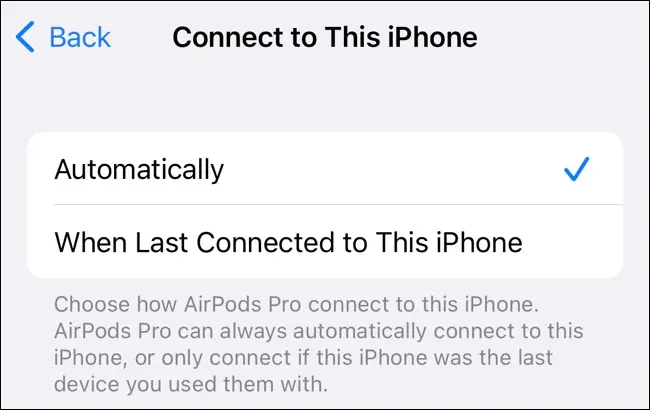
By accessing your Mac 's Bluetooth settings and clicking the "i" next to your AirPods , you can change this setting on a per-device basis. This is useful for devices where it would be convenient to have it on (like an iPad), and turning it off for other devices where it might be more of a nuisance (like your Mac).
Using customizable shortcuts
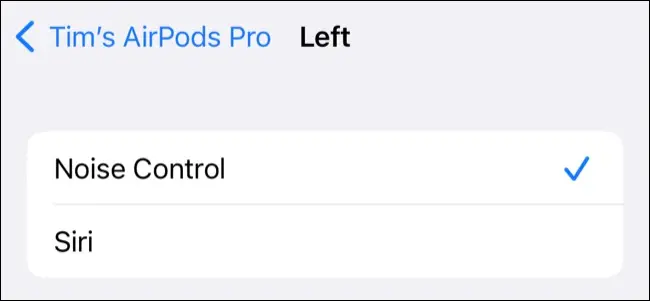
With both the original AirPods and the AirPods , you can use the double-tap gesture. This lets you assign different functions to each earbud, such as pausing and playing music, using Siri , or skipping tracks.
The third-generation AirPods are equipped with a force sensor that is activated by squeezing. For example, you can squeeze to play and pause music, double squeeze to skip forward, triple squeeze to skip back, or a squeeze-and-hold to activate Siri. You can also answer incoming calls with a single squeeze.
The AirPods Pro and AirPods also use a force sensor, with the controls being the same as the AirPods . The only exception here is that to toggle between Transparency and Active Noise Cancellation, you have to press and hold them. You can always change this behavior later from the AirPod settings panel if you need to.
AirPods Max have a digital crown that lets you play or pause music with a single press, double-press to skip to the next track, triple-press to go back, and rotate to adjust volume. You can also press the noise-cancelling button to toggle between Transparency and active noise cancellation. You can change these settings if you want.
See also: iPhone 15: Rumors say it will have a rounder design
If you want to see if AirPods have customizable controls, go to Settings > Bluetooth. From there, tap the “i” next to AirPods while you’re wearing them.
Active Noise Cancellation
If you have a pair of AirPods Pro, Beats Fit Pro, Beats Studio Buds, or AirPods Max, you can use active noise cancellation (ANC) to block out ambient noise. By pressing and holding the stem on AirPods or using the dedicated noise control button on the Airpods Max, ANC promises pretty good results.
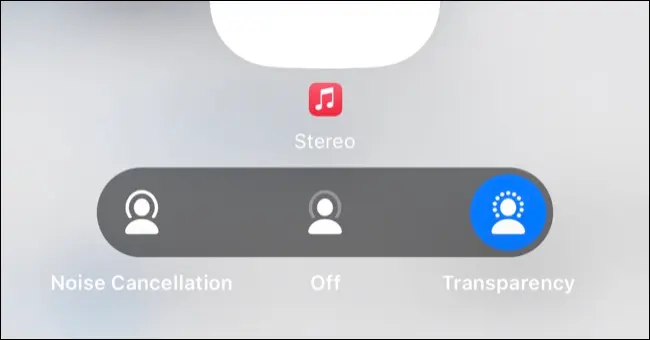
You can change these settings whenever you use your AirPods: on an iPhone or iPad, open Control Center and press and hold the Volume Slider. Tap the “Noise Control” to choose between the following options: Noise Cancellation, Off, and Transparency. On a Mac, click Sound in Control Center when AirPods are connected.
Although turning on ANC (active noise cancellation) consumes more battery power than simply turning the setting off, if you're interested in using as little of your available battery life as possible (or if you're listening in a fairly quiet environment), it might be worth turning this feature off.
Hear the world around you with Transparency Mode
Almost the entire AirPods family is compatible with Transparency mode , including: AirPods Pro, Beats Fit Pro, Beats Studio Buds, and AirPods Max . You can toggle this setting by holding down the stem of your AirPods or by pressing the noise control button if you have AirPods Max.
This feature is not only useful, but also convenient, since you don't have to take off your headphones every time someone wants to talk to you. The Transparency could also be considered an important safety measure – especially if you're a runner or cyclist who likes to listen to music while exercising.
While Transparency is great, it does have some limitations. For example, if you’re playing music at a high volume and someone starts talking to you, it can be hard to hear what they’re saying. However, with spoken content like podcasts, this isn’t as much of an issue. To get the best results from Transparency ,quickly lower the volume or mute your audio with a single tap (or press the Digital Crown on AirPods Max) before turning on Transparency.
Share audio with other AirPods (or Beats)
You can share what you're listening to with someone else through headphones, including AirPods , older Beats like the BeatsX , and any other headphones that use the W1, H1, or H2. You'll also need an iPhone 8 or later, iPad fifth-generation or later, iPad Air third-generation, or similar for this to work.
When you're ready to share your audio wirelessly, start listening to your personal AirPods or Beats as usual. After that, Control Center will appear on iPhone or iPad by swiping down from the top-right corner of the screen. From there, tap where it says AirPlay (wireless audio) in the top-right corner of the Now Playing box.
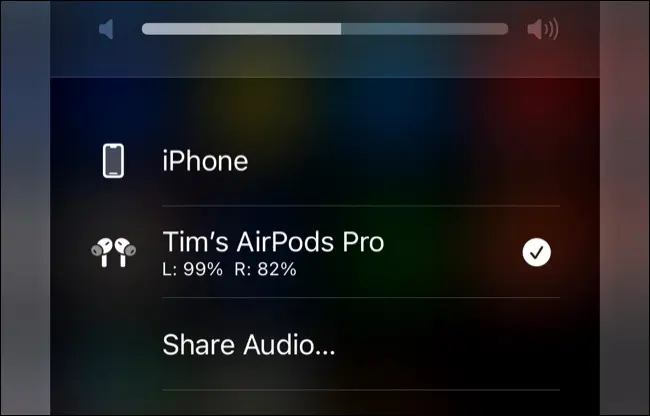
After selecting the “Share Audio…” prompt in the device list, it’s time to pair your friend’s AirPods. To do this, hold their charging case nearby with the earbuds inside and the lid open. If they’re using AirPods Max , simply tell them to hold them near the device. Finally, for Beats headphones , put them in pairing mode before holding them near.
The second pair of headphones will appear in the list as an available device to select. Once connected, you can manage the volume levels for each person using the slider in the device list. To finish sharing music with someone, tap their name from the devices in Control Center.
Listen to Spatial Audio with Dolby Atmos
Immersive spatial audio with immersive surround sound is now available on AirPods Pro , AirPods 3rd generation, AirPods Max and Beats Fit Pro . You don’t need anything special to enjoy this new feature, other than a compatible device like Apple Music, Tidal, Netflix or Apple TV+ . Look for the Dolby Atmos logo the next time you’re trying to decide what content to consume using your AirPods or Beats headphones !
To use spatial audio on an iPhone or iPad, start playing a compatible source, then open Control Center by swiping down from the top-right corner of the screen. Now press and hold the volume slider, then tap “Spatial Audio” and choose between “Fixed” and “Head Tracked” modes , or “Off” to disable the setting completely.
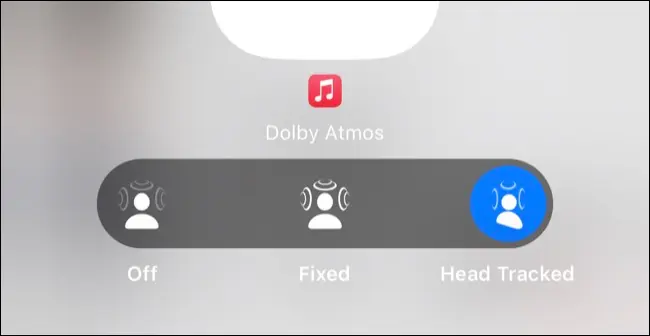
There are many Dolby Atmos experiences , each with its own advantages. Head tracking can make your experience more immersive, but it may not be the best choice for every situation. You can also set “Spatialize Stereo ,” but this may not always produce the best sound quality. If you want to personalize your audio experience even further, you can scan your head and set up personalized spatial audio — a feature introduced in iOS 16.
See also: Brazil: Regulator seizes hundreds of iPhones
Cinema sound with Apple TV
If you have an Apple TV, your AirPods will be available without having to go through the pairing process again. Press and hold the Home on your remote, then tap AirPlay (the wireless audio button that looks like a circle with a few triangles behind it) to see a list of available outputs. With AirPods already in your ears, you'll now be able to select them from the other options that appear as an output for your purposes on Apple TV .
If you have AirPods Pro, third-generation AirPods, AirPods Max , or compatible Beats models, you'll be able to use your headphones to enjoy spatial audio with Dolby Atmos, like Apple TV+, Netflix, and more. However, for this feature to work, you'll need a first-generation (2017) Apple TV 4K or later.
While other speakers can be connected to an Apple TV, they will only be able to produce standard stereo sound.
Use Siri with AirPods
With the “Hey Siri” setting on your iPhone or iPad (you can turn it on in Settings > Siri & Search), whenever you put on your AirPods , they will automatically become the default microphone. You can activate Siri while wearing them by saying things like “Hey Siri, set a timer for five minutes” so you can do other tasks hands-free.
If you don’t use “Hey Siri,” you can still use Siri with your AirPods, but you’ll need to manually enable it. This works differently depending on which model of AirPods you have. For example, third-generation AirPods invoke Siri when you press and hold the earbud. On AirPods Pro models, however, you can change this default behavior in Settings > Bluetooth. Then, tap the “i” next to the specific AirPod model you have.
Connect Airpods to anything with Bluetooth
You can connect your AirPods to any Apple device effortlessly, even if they haven't been paired yet. You can also connect them to other Bluetooth, like a Nintendo Switch or a Windows PC, just as easily. Once connected, you can switch between these devices at any time by entering pairing mode.
If you want to do this with AirPods other than AirPods Max, place your AirPods in the charging case and open it. Press and hold the button on the back of the case until you see the LED start flashing. Now connect AirPods as you would any other Bluetooth (usually by going to the Bluetooth settings on whatever device you're using).
AirPods Max work in a similar way, but you have to hold down the noise control button until the status light flashes white.
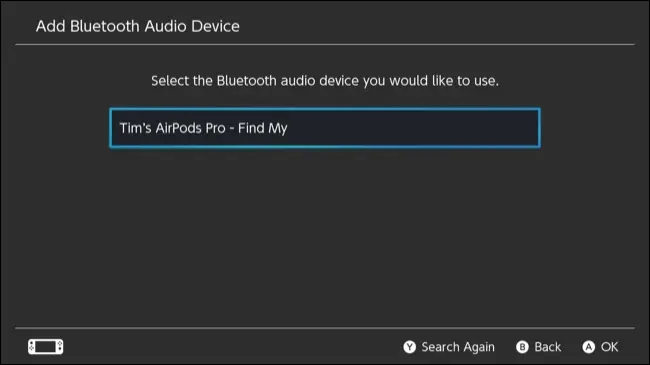
To start using your AirPods with your iPhone or other Apple products again, simply select them as an audio source in iOS or macOS. If you want to use them with another Bluetooth device, you'll need to pair them again (but the process will be quicker if you've already done so in the past).
Find your lost AirPods
The Find My app lets you locate your AirPods by displaying their last known location on a map. Open the app and go to Devices (or search in the sidebar on a Mac). From there, select your AirPods.
If an AirPod falls out of its case but is still within range of another device, you can select “Play Sound” to alert you. Avoid holding the AirPod to your ear when doing this because the sound it makes is very loud. To have the best chance of finding your lost AirPod , you should make sure the room is as quiet as possible. That way, even if it slips through the crack of your couch, you’ll be more likely to find it.
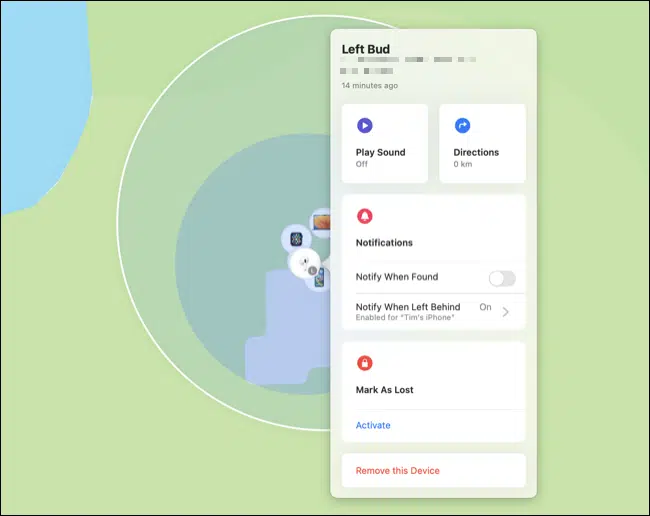
If you can't find AirPods , you can set them to appear "lost," which is similar to Lost Mode on your iPhone, Mac, or AirTag. If another iPhone user comes across your lost headphones and tries to pair them, they'll see a message that can help you get back to your AirPods.
Fit Test for matching earbuds
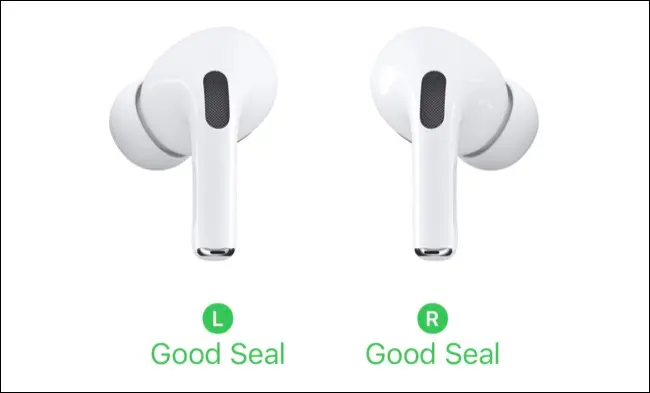
When you first receive your AirPods Pro or third-generation AirPods, you'll be given the option to choose which earbuds to use. For best results, these earbuds should form a seal with your ear canal—however, a seal that's too tight can cause the earbuds to fall out or become uncomfortable.
If you want to see if your current earbuds fit well, follow these steps: put your AirPods in your ears, then go to Settings > Bluetooth. Find and tap the “i” next to your AirPods, then select Test Ear Tip Fit and follow the instructions provided.
Charge wirelessly
You can easily charge your AirPods Pro, AirPods 2nd generation, or later with the wireless charging case using a certified Qi. To check if it's working, simply place your AirPods on the charger and look for the yellow indicator light. If you see a red indicator instead, then try repositioning the charging case.
With AirPods, you can charge the case alone or with the earbuds in. If you have second-generation AirPods Pro, you can use an Apple Watch charger, because that model comes with a MagSafe charging case.
Additionally, a case isn't the only accessory you might want to buy for AirPods , but it's one of the few that's actually worth it. This will prevent your AirPods from falling out of the charging case.
In summary, there are many things about your AirPods that you may not have known about. You can really enjoy the device by getting the most out of it with this knowledge.
Source: howtogeek.com
