

Telegram is a popular messaging app that emphasizes privacy. By default, Telegram shows everyone the last time you were online. Here's how to hide it.

Changing how “Last Seen Online” appears
Telegram is available for iPhone and iPad, Android, Windows, Mac , and Linux. Because the developers took a similar approach with each app, the instructions for changing this setting are the same.
To find this option, tap or click the settings gear at the bottom of the screen or window.

In the menu that appears, select “Privacy and Security”.
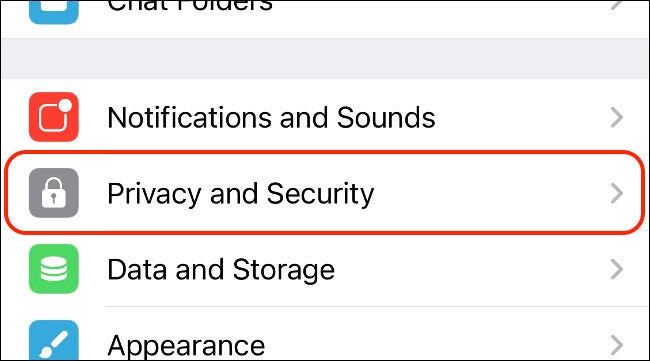
Tap “Last Seen & Online” under the Privacy header.
On the next screen, you can specify exactly who can see your “Last Seen Online” time: Everybody (including users you haven’t added), My Contacts, and Nobody.
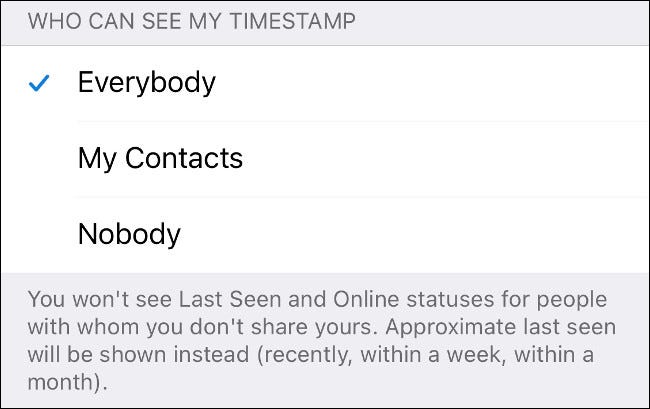
Depending on the setting you choose, you can add exceptions to this rule.
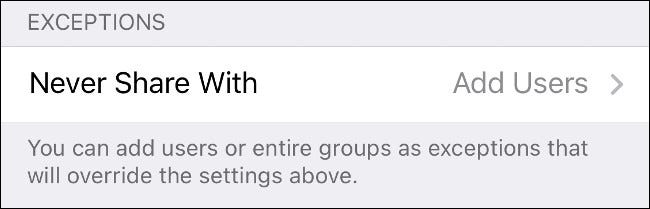
While using Telegram's privacy settings, check that everything else is correct. You can set other preferences, such as who can and cannot add you to group chats, who you can receive calls from, and who can forward your messages to other accounts.
What contacts see when you change this setting
By default, this setting will display the exact date you were last online. If it's been less than 24 hours since then, the exact time you were last online will also be included in this information.
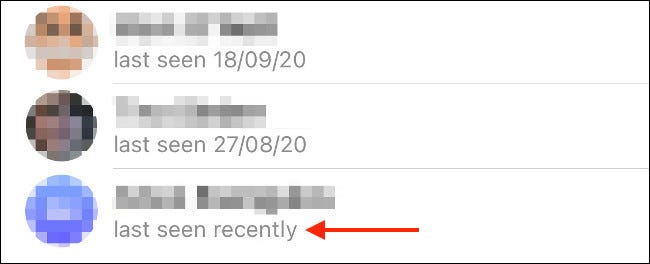
Telegram notes that there are four possible options (regarding when you were last seen online):
- Recently: Up to three days ago.
- Within a week: Between three and seven days.
- Within a month: From seven days to one month.
- A long time ago: More than a month ago.
Blocked users will always see “A long time ago,” even if you chatted with them recently.
Information source: howtogeek.com
