

See in this guide how to download and install the new Cascadia Code font in the command line and Windows PowerShell.
Each font serves a different purpose. Some look great on a restaurant menu, some look great on a business card, and some look great in comic books. With that in mind, Microsoft created the Cascadia Code font, designed specifically for the Windows command line and applications that type programming code.
For those of you who work with Command Prompt or PowerShell, see how you can download and install the new font.
Installing Cascadia Code in Command Prompt
Cascadia Code is an open source TTF font. Go to this Github page and download the Cascadia.ttf file.
To install the font, double-click the Cascadia.ttf file you downloaded and in the window that opens, click “Install.” The installation only takes a few seconds.
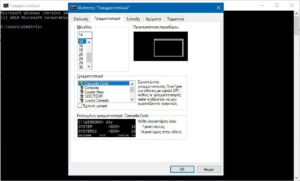
Open Command Prompt and right-click on the window title bar. From the context menu, select 'Properties'. Go to the “Font” tab and look for the list of fonts under the “Font” box. Select Cascadia Code and click OK.
When you return to the command prompt, you will see the new font. This setting will apply every time you open Command Prompt.
Installing Cascadia code in PowerShell
For PowerShell do exactly the same things you did in Command Prompt. Open PowerShell and right-click on the title bar. From the context menu, select Properties.
Go to the Font tab and look for Cascadia Code in the list of fonts in the Font section. Select it and click OK.
You can change the font whenever you want if you don't like the look of the new one. Since Cascadia Code is installed system-wide, you will be able to use it in other applications that allow you to choose a font, such as Microsoft Word, Illustrator, Paint.net, Photoshop, etc.
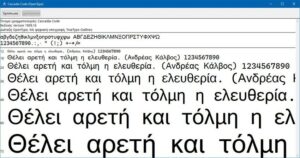
Please note that the new Cascadia Code font does NOT support Greek. If you are running the Greek version of Windows, then where you have Greek letters in the command line application, you will see an upright rectangular shape in their place. Microsoft has not done us any favors in this regard.
Alternatively, if you want a font that is built for code and supports Greek and Cyrillic, then try Hack. The installation method is the same.
