

CCleaner 5.46 was released yesterday with the aim of fixing the problems of the previous version CCleaner 5.45 that was withdrawn by the company.
In the new version, Piriform added settings that allow you to disable the monitoring process but also disable the sending of anonymous usage statistics.
In the previous version CCleaner 5.45, users found that they could not permanently disable the application's Active Monitoring feature. The feature started automatically the next time the application or computer was restarted. With the new version, you can disable the sending of anonymous usage data to Piriform, something that you could not do in the version 5.45 that the company withdrew.
It is worth mentioning that in the previous version, not only could you not disable the feature, but you could not close the application either! You could minimize CCleaner, there was no obvious way to end the program, which required users to end the process from the Task Manager, in order to close the program.
So Piriform decided to pull version 5.45 until it could develop version 5.46, which was released yesterday.
Piriform says:
Privacy Settings
– Added a separate control for reporting anonymous usage data
– Added a link to a data factsheet (https://www.ccleaner.com/about/data-factsheet), which explains the data reported by CCleaner, why it is reported, and what it is used for.
Smart Cleaning
– We renamed the “Monitoring” feature to “Smart Cleaning”, to better describe its function (smart cleaning notifications)
– We reworded the checkboxes for clarity
– If Smart Cleaning is disabled, the CCleaner background process will be closed and will not run again on startup
General
– Restore previous System Tray and minimize
– Fixed various stability issues
CCleaner 5.46 gives you control over your data
With the release of CCleaner 5.46, users seem to be able to decide how their data, anonymous or not, is sent to Piriform.
Those who wish to disable the sending of anonymous usage data can do so by going to: Options – Privacy and unchecking the option “Help improve CCleaner by sending anonymous usage data”.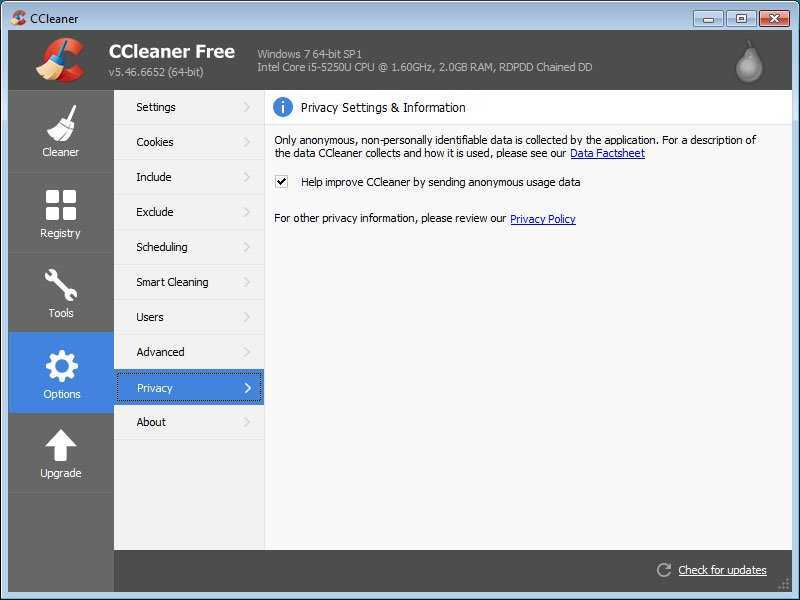
In the new version, you can now also disable the Smart Cleaning feature from Options – Smart Cleaning.
If you want to use the application again, you should be careful during installation, as it still displays installation offers for other applications, for example you should untick to prevent Google Chrome or Avast from being installed.
However, Piriform also offers a slim version that does not contain such offers. You can download it from here.
______________________________
- When will Windows 10 Redstone 5 RTM be released?
- Windows 10 April 2018 Update rollback to previous version
- YouTube what is your favorite song in a video?
- Checksum What is it and why should I care
